
312-50V11 · Question #634
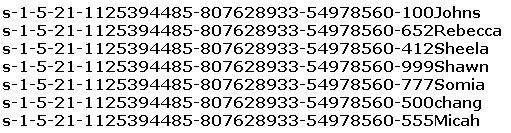
Peter extracts the SIDs list from Windows 2000 Server machine using the hacking tool "SIDExtractor". Here is the output of the SIDs: From the above list identify the user account with System…
The correct answer is F. Chang. Windows assigns the built-in Administrator account a fixed Relative Identifier (RID) of 500 as the last component of its SID, regardless of account renaming. The user whose SID ends in -500 holds System Administrator privileges.
Question
Peter extracts the SIDs list from Windows 2000 Server machine using the hacking tool "SIDExtractor". Here is the output of the SIDs:
From the above list identify the user account with System Administrator privileges.
Exhibit
Options
- AJohn
- BRebecca
- CSheela
- DShawn
- ESomia
- FChang
- GMicah
How the community answered
(25 responses)- A4% (1)
- B4% (1)
- E12% (3)
- F80% (20)
Why each option
Windows assigns the built-in Administrator account a fixed Relative Identifier (RID) of 500 as the last component of its SID, regardless of account renaming. The user whose SID ends in -500 holds System Administrator privileges.
John's SID does not end in RID 500, so this account is not the built-in Administrator.
Rebecca's SID does not end in RID 500, indicating a standard non-administrator account.
Sheela's SID does not end in RID 500, so this account lacks built-in System Administrator status.
Shawn's SID does not end in RID 500, meaning this is not the built-in Administrator account.
Somia's SID does not end in RID 500, so this is a standard user account without built-in Administrator privileges.
Windows SIDs follow the format S-1-5-21-domain-RID, where RID 500 is permanently reserved for the built-in Administrator account. Chang's SID ends in -500, identifying it as the built-in Administrator account with System Administrator privileges even if the account has been renamed.
Micah's SID does not end in RID 500, indicating this is a standard user account.
Concept tested: Windows SID structure and built-in Administrator RID 500
Source: https://learn.microsoft.com/en-us/windows-server/identity/ad-ds/manage/understand-security-identifiers
Topics
Community Discussion
No community discussion yet for this question.