
312-49 · Question #686
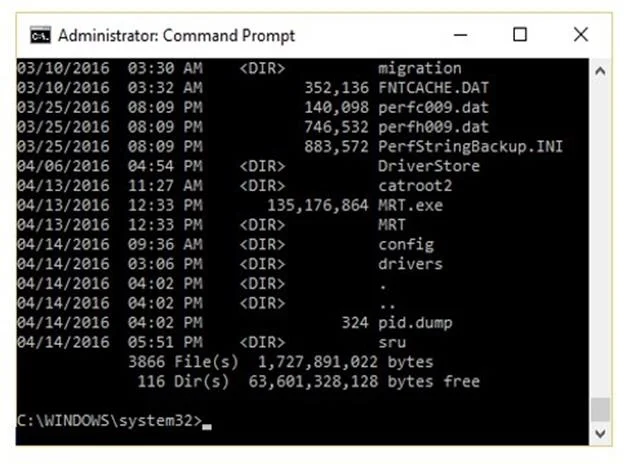
The given image displays information about date and time of installation of the OS along with service packs, patches, and sub-directories. What command or tool did the investigator use to view this…
The correct answer is A. dir /o:d. The 'dir /o:d' command sorts directory listings by date and time, with the oldest files appearing first and the newest last. This is useful in forensic investigations to chronologically view when the OS was installed, when service packs and patches were applied, and when…
Question
The given image displays information about date and time of installation of the OS along with service packs, patches, and sub-directories. What command or tool did the investigator use to view this output?
Exhibit
Options
- Adir /o:d
- Bdir /o:s
- Cdir /o:e
- Ddir /o:n
How the community answered
(46 responses)- A87% (40)
- B2% (1)
- C4% (2)
- D7% (3)
Explanation
The 'dir /o:d' command sorts directory listings by date and time, with the oldest files appearing first and the newest last. This is useful in forensic investigations to chronologically view when the OS was installed, when service packs and patches were applied, and when subdirectories were created. The other options sort by different criteria: /o:s sorts by file size, /o:e sorts by file extension, and /o:n sorts by filename alphabetically.
Topics
Community Discussion
No community discussion yet for this question.