
300-915 · Question #55
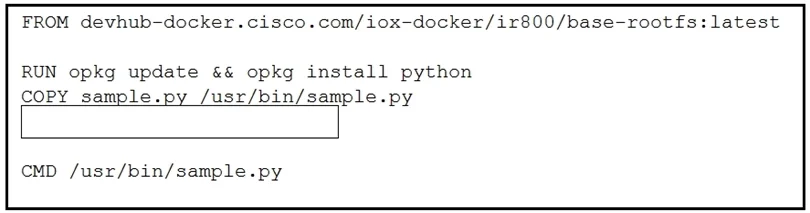
Refer to the exhibit. Which line of code completes the Dockerfile?
The correct answer is A. RUN chmod 777 /usr/bin/sample.py. Option A is correct because placing a Python script in /usr/bin/sample.py is useless unless the file has execute permissions - chmod 777 grants read, write, and execute permissions to all users, making the script runnable as a command inside the container. Why the distractors…
Question
Refer to the exhibit. Which line of code completes the Dockerfile?
Exhibit
Options
- ARUN chmod 777 /usr/bin/sample.py
- BRUN chown root:root /usr/bin/sample.py
- CWORKDIR /usr/bin
- DUSER root
How the community answered
(24 responses)- A75% (18)
- B8% (2)
- C13% (3)
- D4% (1)
Explanation
Option A is correct because placing a Python script in /usr/bin/sample.py is useless unless the file has execute permissions - chmod 777 grants read, write, and execute permissions to all users, making the script runnable as a command inside the container.
Why the distractors are wrong:
- B (
chown root:root) - Files copied into a Docker image are already owned by root by default; changing ownership doesn't grant execute permission, so the script still couldn't run. - C (
WORKDIR /usr/bin) - This only sets the working directory for subsequent instructions; it doesn't affect file permissions or makesample.pyexecutable. - D (
USER root) - Switching to the root user changes who runs future commands, not whether the file itself is executable; without execute bits set, even root can't run it as a script directly.
Memory tip: In Dockerfiles, anytime you COPY a script into a bin directory (a location meant for executables), your next thought should be "can this actually execute?" - chmod +x (or 777) is the answer. If it's not executable, it's just a text file sitting in a bin folder.
Topics
Community Discussion
No community discussion yet for this question.