
300-915 · Question #35
Drag and Drop Question Drag and drop the Dockerfile instructions from the left onto the correct arguments on the right. Answer:
The correct answer is FROM; ADD; WORKDIR; RUN; EXPOSE. Dockerfile Instruction Ordering Explained The correct order reflects the logical build sequence Docker follows when constructing an image layer by layer. --- 1. FROM Must always be first. It declares the base image (e.g., FROM ubuntu:22.04). Every subsequent instruction builds…
Question
Drag and Drop Question Drag and drop the Dockerfile instructions from the left onto the correct arguments on the right. Answer:
Exhibit
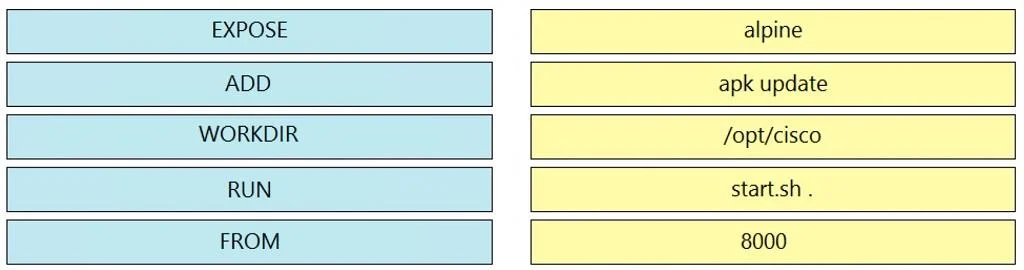
Answer Area
Drag items
Correct arrangement
- FROM
- ADD
- WORKDIR
- RUN
- EXPOSE
Explanation
Dockerfile Instruction Ordering Explained
The correct order reflects the logical build sequence Docker follows when constructing an image layer by layer.
1. FROM
Must always be first. It declares the base image (e.g., FROM ubuntu:22.04). Every subsequent instruction builds on top of it. Without a base image, Docker has nothing to work with - no filesystem, no environment, nothing.
Common mistake: Thinking you can put
RUNorENVbeforeFROM. You can't - Docker will error immediately.
2. ADD
Copies files/directories (or URLs/tarballs) from the host into the image. It comes early because the files it copies are often needed by subsequent steps - config files, source code, scripts that RUN will execute.
Common mistake: Confusing
ADDwithCOPY.ADDhas extra powers (auto-extracts tarballs, fetches URLs), butCOPYis preferred when you just need to copy local files. Either way, both go before steps that use those files.
3. WORKDIR
Sets the working directory for all subsequent instructions (RUN, CMD, ENTRYPOINT, COPY, ADD). It comes after files are added so the directory context is established before any commands are executed against those files.
Common mistake: Placing
WORKDIRafterRUN. IfRUNexecutes a script that depends on relative paths, it needsWORKDIRset first or it'll run from the wrong directory.
4. RUN
Executes commands inside the image at build time (installs packages, compiles code, etc.). It comes after ADD/WORKDIR because:
- It often operates on files that
ADDcopied in - It needs
WORKDIRset so relative paths resolve correctly
Common mistake: Running
RUNbeforeADDwhen the command depends on files being present, causing a "file not found" build failure.
5. EXPOSE
Documents which port(s) the container listens on at runtime. It's purely metadata - it doesn't actually open ports, it just signals intent to Docker and users. It goes last because it's a runtime declaration, not a build-time action, and has no dependency on any other instruction.
Common mistake: Thinking
EXPOSEactually publishes a port. It doesn't - you still need-pindocker runorports:in Compose to bind to the host.
The Mental Model
FROM      → what we're starting with
ADD       → bring in our files
WORKDIR   → set our location
RUN       → build/install using those files
EXPOSE    → declare runtime behavior
Each step depends on the ones before it. This layered dependency is exactly why order matters in Dockerfiles.
Topics
Community Discussion
No community discussion yet for this question.