
300-835 · Question #40
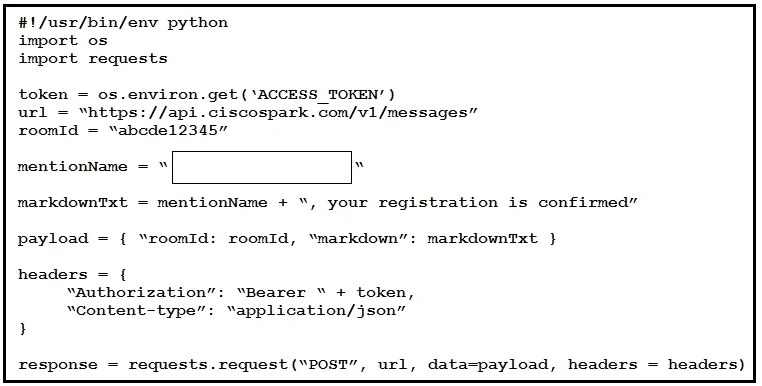
Refer to the exhibit. Drag and drop the code snippets from the bottom onto the blanks in the script to create a new CSS in Cisco UCM by using AXL with a route partition directory. Some options may…
I notice the exhibit image and code snippet options are missing from your question - the options field shows {} (empty) and there's no visible script with blanks. Without the actual script template and drag-and-drop options, I can't map answers to specific blanks. That said…
Question
Exhibit
Explanation
I notice the exhibit image and code snippet options are missing from your question - the options field shows {} (empty) and there's no visible script with blanks. Without the actual script template and drag-and-drop options, I can't map answers to specific blanks.
That said, here is a thorough conceptual explanation of the procedure so you understand the reasoning regardless of the specific syntax used:
Overall Goal
Create a Calling Search Space (CSS) in Cisco UCM via AXL, associating it with one or more Route Partitions. AXL (Administrative XML Layer) is a SOAP-based API that lets you automate UCM administration tasks - including creating dial plan objects - instead of using the GUI manually.
Key Concepts
CSS (Calling Search Space)
A CSS defines which route partitions a device or line can reach. It is an ordered list of partitions. When a call is placed, UCM searches those partitions in order for a matching directory number or route pattern.
Route Partition
A logical grouping of directory numbers and route patterns. Partitions control who can be called; CSS controls who can call whom.
AXL
A SOAP/XML API exposed by UCM. You authenticate, build an XML request body, and POST it to the UCM AXL endpoint. The typical Python approach uses the zeep SOAP library or raw requests with XML.
Typical Script Structure (Step-by-Step)
Step 1 - Import libraries
import requests
from requests.auth import HTTPBasicAuth
Why: You need requests to make HTTPS calls and HTTPBasicAuth to authenticate against the AXL API. Skipping this means no HTTP capability.
Step 2 - Define connection parameters
ucm_host = "https://<UCM_IP>:8443"
username = "admin"
password = "password"
axl_url = f"{ucm_host}/axl/"
Why: AXL listens on port 8443. You must target the correct endpoint (/axl/). Wrong port or path = connection refused or 404.
Step 3 - Set AXL headers
headers = {
    "Content-Type": "text/xml",
    "SOAPAction": "CUCM:DB ver=14.0 addCss"
}
Why: AXL is SOAP-based. The Content-Type must be text/xml and SOAPAction tells UCM which AXL operation to invoke. Using the wrong SOAPAction results in an AXL fault response.
Step 4 - Build the SOAP/XML payload
payload = """
<soapenv:Envelope xmlns:soapenv="http://schemas.xmlsoap.org/soap/envelope/"
                  xmlns:ns="http://www.cisco.com/AXL/API/14.0">
  <soapenv:Body>
    <ns:addCss>
      <css>
        <name>My_CSS</name>
        <members>
          <member>
            <routePartitionName>My_Partition</routePartitionName>
            <index>1</index>
          </member>
        </members>
      </css>
    </ns:addCss>
  </soapenv:Body>
</soapenv:Envelope>
"""
Why: This is the actual AXL addCss request. The <name> is the CSS name; <members> lists the partitions assigned to it with their search order (<index>). Missing <index> or wrong namespace = AXL schema validation error.
Step 5 - Send the request
response = requests.post(
    axl_url,
    data=payload,
    headers=headers,
    auth=HTTPBasicAuth(username, password),
    verify=False
)
Why: Posts the SOAP body to UCM. auth= handles Basic Auth. verify=False skips TLS cert validation (common in lab environments - use proper certs in production). Without auth, UCM returns 401.
Step 6 - Check the response
print(response.status_code)
print(response.text)
Why: A 200 with a <return> UUID in the body confirms success. An AXL fault in the response body indicates a problem (e.g., duplicate name, partition doesn't exist). Skipping this step means you won't know if the CSS was actually created.
What Goes Wrong If Steps Are Out of Order
| Skipped/Misplaced Step | Result |
|---|---|
Wrong SOAPAction header | UCM returns an AXL fault - wrong operation |
| Route partition doesn't exist yet | addCss fails - partitions must exist before referencing them in a CSS |
| No auth credentials | HTTP 401 Unauthorized |
| Wrong AXL namespace version | Schema mismatch error |
Missing <index> in members | AXL may reject the payload or create CSS with undefined order |
Memory Tip
Think of it as "CHPSC": Connect → Headers → Payload → Send → Check.
Always create the Route Partition before the CSS - a CSS is just a container that references partitions. You can't reference what doesn't exist.
If you can share the actual exhibit image or paste the code snippet options, I can map the correct answers to each specific blank in the script.
Topics
Community Discussion
No community discussion yet for this question.