
300-820 · Question #186
Refer to the exhibit. The web server is set up to store contact photos and the Cisco Jabber- config.xml file is updated for all clients. After these changes, Jabber for Windows users cannot view the…
The correct answer is C. Add the web-server address within the HTTP server allow list on the Expressway-C. Jabber MRA users cannot view contact photos hosted on an external web server because Expressway-C blocks the HTTP requests; the web server must be added to the Expressway-C HTTP allow list.
Question
Refer to the exhibit. The web server is set up to store contact photos and the Cisco Jabber- config.xml file is updated for all clients. After these changes, Jabber for Windows users cannot view the contact photos when they are connected via Mobile and Remote Access. Which action resolves the issue?
Exhibit
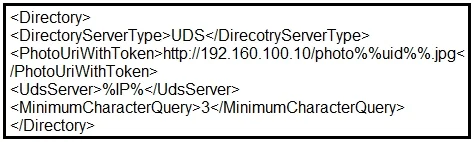
Options
- AUpdate the "PhotoUriWithToken' entry to "Https".
- BUpdate the contact photos to "png".
- CAdd the web-server address within the HTTP server allow list on the Expressway-C.
- DAdd the web-server address within the HTTP server allow list on the Expressway-E.
How the community answered
(24 responses)- A4% (1)
- B13% (3)
- C79% (19)
- D4% (1)
Why each option
Jabber MRA users cannot view contact photos hosted on an external web server because Expressway-C blocks the HTTP requests; the web server must be added to the Expressway-C HTTP allow list.
The PhotoUriWithToken parameter controls token-based photo authentication, not whether the Expressway proxy allows access to the web server; changing the protocol scheme alone does not unblock the HTTP proxy restriction.
Contact photo format (PNG vs. other formats) is not related to MRA connectivity or the Expressway HTTP proxy allow list; format changes do not resolve proxy blocking.
Expressway-C acts as a security proxy for all HTTP/HTTPS requests made by Jabber clients connected via MRA, and it blocks outbound requests to any server not explicitly listed in the HTTP server allow list. Adding the photo web server's address to this allow list on Expressway-C permits Jabber clients to successfully retrieve contact photos through the MRA path.
Expressway-E sits at the network edge and handles external client connections, but HTTP allow list filtering for internal resource access is enforced on Expressway-C, not Expressway-E.
Concept tested: Expressway-C HTTP allow list for Jabber MRA contact photos
Source: https://www.cisco.com/c/en/us/td/docs/voice_ip_comm/expressway/config_guide/X14-3/exwy_b_mra-deployment-guide/exwy_m_jabber-and-mra.html
Topics
Community Discussion
No community discussion yet for this question.