
300-810 · Question #269
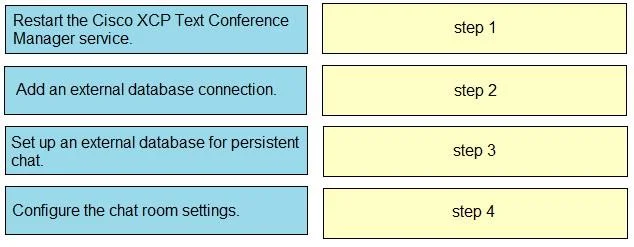
Drag and Drop Question An engineer must enable group chat and persistent chat within Cisco UCM and the Cisco IM and Presence service cluster. The engineer has already configured the group chat…
The correct answer is Configure the chat room settings.; Restart the Cisco XCP Text Conference Manager service.; Set up an external database for persistent chat.; Add an external database connection. To enable persistent chat in Cisco IM and Presence, an external database must first be set up and connected, followed by chat room configuration and a service restart to apply changes.
Question
Exhibit
Answer Area
Drag items
Correct arrangement
- Configure the chat room settings.
- Restart the Cisco XCP Text Conference Manager service.
- Set up an external database for persistent chat.
- Add an external database connection.
Explanation
To enable persistent chat in Cisco IM and Presence, an external database must first be set up and connected, followed by chat room configuration and a service restart to apply changes.
Approach. The correct interaction is to drag and drop the configuration steps into the following order:
- Set up an external database for persistent chat. (Drag this to 'step 1') - Persistent chat requires an external database to store chat history. This database must be provisioned and prepared before any connection can be made to it or any features relying on it can be configured.
- Add an external database connection. (Drag this to 'step 2') - Once the external database is set up, the Cisco IM and Presence service needs to be configured to connect to it. This involves specifying connection parameters, credentials, etc.
- Configure the chat room settings. (Drag this to 'step 3') - With the persistent chat database infrastructure in place and connected, you can then proceed to configure the actual chat room settings, including enabling persistent chat for specific rooms or users, which relies on the previously configured external database connection.
- Restart the Cisco XCP Text Conference Manager service. (Drag this to 'step 4') - The Cisco XCP Text Conference Manager service is responsible for handling group chat and persistent chat sessions. After making significant changes to persistent chat configuration, especially introducing a new external database, a restart of this service is typically required for the new configurations to take effect and for the service to properly utilize the external database.
Common mistakes.
- common_mistake. A common mistake is to configure application-level features like chat room settings before the underlying infrastructure (like the external database setup and connection) is complete. For example, placing 'Configure the chat room settings' as step 1 or 2 is incorrect because persistent chat rooms depend on a functioning external database connection. Similarly, restarting services prematurely (e.g., before the database is set up and connected) would not apply the full configuration and could lead to functionality issues. Restarting a core service is usually one of the final steps to ensure all new configurations are loaded and operational.
Concept tested. The core concept being tested is the logical order of operations for configuring persistent chat in Cisco Unified Communications Manager (UCM) and Cisco IM and Presence Service, specifically understanding the dependency of persistent chat on an external database and the role of service restarts in applying configurations.
Topics
Community Discussion
No community discussion yet for this question.