
300-810 · Question #24
Drag and Drop Question Drag and drop the steps from the left into the correct order on the right that describes the flow of presence updates when a user manually sets the presence status in Cisco…
The correct answer is User manually sets presence status to "Off Shift"; Jabber sends an XMPP message on TCP port 5223 to the Presence Engine via the XCP Federation Connection Manager and XCP Router.; The Presence Engine responds to Jabber via XCP Connection Manager and XCP Router with a confirmation of the status change. The correct interaction is to order the steps for a manual Cisco Jabber presence update: user input, Jabber sending an XMPP message on port 5222 to the Presence Engine, and finally, the Presence Engine confirming the status change back to Jabber.
Question
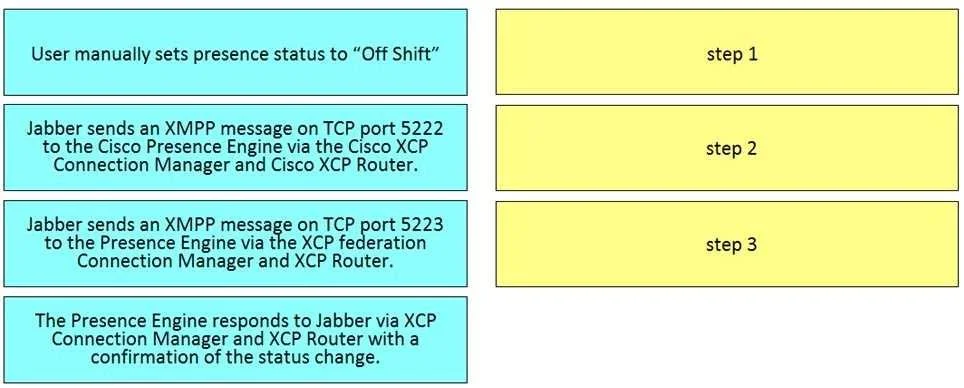
Drag and Drop Question Drag and drop the steps from the left into the correct order on the right that describes the flow of presence updates when a user manually sets the presence status in Cisco Jabber. Not all options are used. Answer:
Exhibit
Answer Area
Drag items
Correct arrangement
- User manually sets presence status to "Off Shift"
- Jabber sends an XMPP message on TCP port 5223 to the Presence Engine via the XCP Federation Connection Manager and XCP Router.
- The Presence Engine responds to Jabber via XCP Connection Manager and XCP Router with a confirmation of the status change.
Explanation
The correct interaction is to order the steps for a manual Cisco Jabber presence update: user input, Jabber sending an XMPP message on port 5222 to the Presence Engine, and finally, the Presence Engine confirming the status change back to Jabber.
Approach. The correct sequence for a user manually setting their presence status in Cisco Jabber and the system updating it is as follows:
-
Drag 'User manually sets presence status to "Off Shift"' to 'step 1'. This is the initiating action by the user, directly triggering the presence update process.
-
Drag 'Jabber sends an XMPP message on TCP port 5222 to the Cisco Presence Engine via the Cisco XCP Connection Manager and Cisco XCP Router.' to 'step 2'. After the user input, Jabber, as an XMPP client, sends the presence update message to the Cisco Presence Engine. TCP port 5222 is the standard port for client-to-server XMPP communication within the same domain or cluster. The XCP Connection Manager and XCP Router are integral components of the Cisco IM and Presence architecture that facilitate this communication.
-
Drag 'The Presence Engine responds to Jabber via XCP Connection Manager and XCP Router with a confirmation of the status change.' to 'step 3'. Once the Presence Engine receives and processes the update, it sends a confirmation back to the Jabber client, acknowledging the status change. This completes the immediate client-server interaction for the manual update.
The option 'Jabber sends an XMPP message on TCP port 5223 to the Presence Engine via the XCP federation Connection Manager and XCP Router.' is not used because TCP port 5223 is typically used for XMPP federation (inter-domain communication) or secure client connections, which is a subsequent or different type of interaction, not the immediate, direct flow for a user manually setting their own internal presence status.
Common mistakes.
- common_mistake. A common mistake would be to confuse TCP port 5222 with 5223. Port 5222 is the standard XMPP client-to-server port for internal domain communication, which is relevant for a user setting their own status to their local Presence Engine. Port 5223 is often associated with XMPP federation or secure client-to-server connections, which typically occurs for inter-domain presence sharing or specific secure setups, not the initial internal client update flow. Another mistake could be incorrectly sequencing the Presence Engine's response before Jabber sends the initial update, or including the federation step as part of the primary, direct client-to-server flow for a manual status update.
Concept tested. The core concept tested is the understanding of the Cisco Jabber presence architecture and flow, specifically the role of XMPP (eXtensible Messaging and Presence Protocol), the Cisco Presence Engine (now part of Cisco Unified Communications Manager IM and Presence Service), XCP components (Connection Manager and Router), and the specific TCP ports (5222 vs. 5223) used for presence updates in a Cisco collaboration environment.
Topics
Community Discussion
No community discussion yet for this question.