
300-810 · Question #229
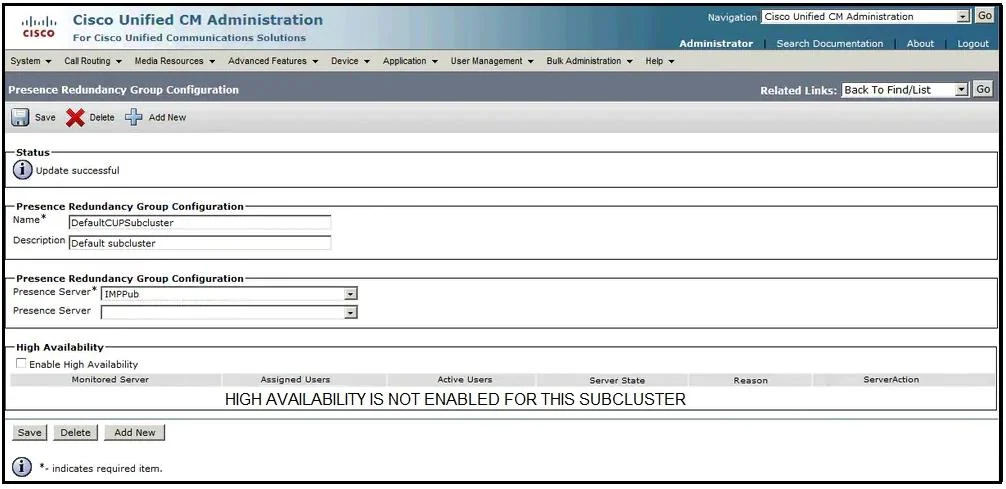
Refer to the exhibit. An engineer must configure Cisco IM and Presence server high availability so that the publisher node fails over to the subscriber node if the publisher node becomes…
The correct answer is D. Add IMPSub as a secondary presence server in the redundancy group. E. Select Enable High Availability and click Save. To enable IM and Presence high availability, two prerequisites must be met: (1) A secondary server (IMPSub) must be added to the Presence Redundancy Group as the secondary presence server - without this, the system has no failover target. (2) The 'Enable High Availability'…
Question
Refer to the exhibit. An engineer must configure Cisco IM and Presence server high availability so that the publisher node fails over to the subscriber node if the publisher node becomes unavailable. On the Presence Redundancy Group Configuration page, the engineer receives this message: "High availability is not enabled for this cluster." Which two actions must the engineer perform to resolve the issue? (Choose two.)
Exhibit
Options
- AAdd a new presence redundancy group and click Save.
- BReplace IMPPub with IMPSub in the redundancy group.
- CClick Save and restart the Cisco Presence Engine.
- DAdd IMPSub as a secondary presence server in the redundancy group.
- ESelect Enable High Availability and click Save.
How the community answered
(15 responses)- A7% (1)
- B7% (1)
- C13% (2)
- D73% (11)
Explanation
To enable IM and Presence high availability, two prerequisites must be met: (1) A secondary server (IMPSub) must be added to the Presence Redundancy Group as the secondary presence server - without this, the system has no failover target. (2) The 'Enable High Availability' checkbox must be selected and saved on the Presence Redundancy Group Configuration page - this is the explicit toggle that activates HA. The error message 'High availability is not enabled' directly indicates that option E is missing. Without a secondary server configured (option D), HA cannot function even if enabled. Restarting the Cisco Presence Engine or modifying DNS records alone does not resolve this configuration-level issue.
Topics
Community Discussion
No community discussion yet for this question.