
300-740 · Question #48
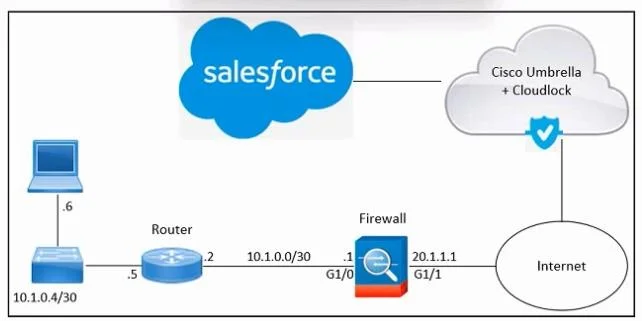
Refer to the exhibit. An engineer must enable access to Salesforce using Cisco Umbrella and Cisco Cloudlock. These actions were performed: From Salesforce, add the Cloudlock IP address to the allow…
The correct answer is A. From the Salesforce admin page, grant API access to Cloudlock. Granting API access from the Salesforce admin page is the missing step because Cisco Cloudlock integrates with Salesforce through its API (via OAuth), not just at the network layer - without explicit API access granted in Salesforce, Cloudlock cannot inspect or enforce policies…
Question
Refer to the exhibit. An engineer must enable access to Salesforce using Cisco Umbrella and Cisco Cloudlock. These actions were performed:
From Salesforce, add the Cloudlock IP address to the allow list From Cloudlock, authorize Salesforce However, Salesforce access via Cloudlock is still unauthorized. What should be done to meet the requirements?
Exhibit
Options
- AFrom the Salesforce admin page, grant API access to Cloudlock.
- BFrom the Salesforce admin page, grant network access to Cloudlock
- CFrom the Cloudlock dashboard, grant API access to Salesforce.
- DFrom the Cloudlock dashboard, grant network access to Salesforce.
How the community answered
(49 responses)- A84% (41)
- B2% (1)
- C4% (2)
- D10% (5)
Explanation
Granting API access from the Salesforce admin page is the missing step because Cisco Cloudlock integrates with Salesforce through its API (via OAuth), not just at the network layer - without explicit API access granted in Salesforce, Cloudlock cannot inspect or enforce policies on Salesforce data, regardless of IP allow-listing or Cloudlock-side authorization.
Why the distractors are wrong:
- B is wrong because network access (adding the Cloudlock IP to the allow list) was already completed in the steps described - that's a network-level permission, not an API-level one.
- C is wrong because the Cloudlock side already authorized Salesforce - the remaining gap is on the Salesforce side, not in Cloudlock.
- D is wrong because "granting network access to Salesforce from the Cloudlock dashboard" is not how the integration works - Cloudlock doesn't control Salesforce's network permissions.
Memory tip: Think of it as a two-key lock - Cloudlock holds one key (authorization from the Cloudlock side, already done), but Salesforce must also turn its key by granting API access. Network access = "I know where you live," API access = "I trust you to read my data."
Topics
Community Discussion
No community discussion yet for this question.