
300-740 · Question #20
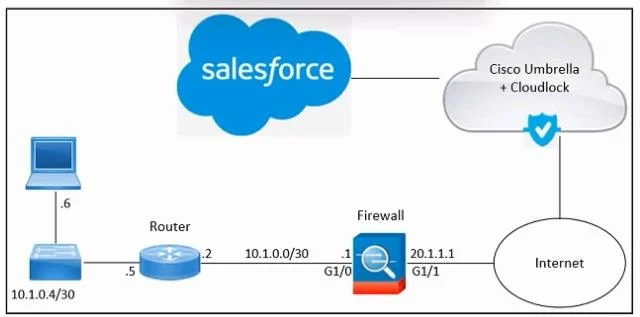
Refer to the exhibit. An engineer must integrate Cisco Cloudlock with Salesforce in an organization. Despite the engineer's successful execution of the Salesforce integration with Cloudlock, the…
The correct answer is B. From Salesforce, enable the View All Data permission. Option B is correct because "View All Data" is a Salesforce system permission that must be granted to the connected application's profile or permission set within Salesforce itself. Even after a successful OAuth handshake between Cloudlock and Salesforce, Cloudlock can only see…
Question
Refer to the exhibit. An engineer must integrate Cisco Cloudlock with Salesforce in an organization. Despite the engineer's successful execution of the Salesforce integration with Cloudlock, the administrator still lacks the necessary visibility. What should be done to meet the requirement?
Exhibit
Options
- AFrom Salesforce, configure the service parameters.
- BFrom Salesforce, enable the View All Data permission.
- CFrom Cloudlock, configure the service parameters.
- DFrom Cloudlock, enable the View All Data permission.
How the community answered
(40 responses)- A8% (3)
- B78% (31)
- C3% (1)
- D13% (5)
Explanation
Option B is correct because "View All Data" is a Salesforce system permission that must be granted to the connected application's profile or permission set within Salesforce itself. Even after a successful OAuth handshake between Cloudlock and Salesforce, Cloudlock can only see what Salesforce's permission model allows - without "View All Data," Cloudlock is blind to records hidden by org-wide sharing rules, meaning the admin gets incomplete visibility.
Why the distractors fail:
- A (Salesforce, service parameters): Service/endpoint parameters are configured on the Cloudlock side during setup, not in Salesforce - and the integration already connected successfully, so connectivity isn't the issue.
- C (Cloudlock, service parameters): Same reasoning - service parameters govern the connection itself, which is already established. Tweaking them won't fix a permissions gap.
- D (Cloudlock, enable View All Data): "View All Data" is a Salesforce permission; it does not exist inside Cloudlock's UI. You cannot grant Salesforce data access from a third-party tool.
Memory tip: Think "permission lives where the data lives." Salesforce owns the data, so Salesforce controls who (or what) can see all of it - flip the switch inside Salesforce, not inside the tool requesting access.
Topics
Community Discussion
No community discussion yet for this question.