
300-725 · Question #26
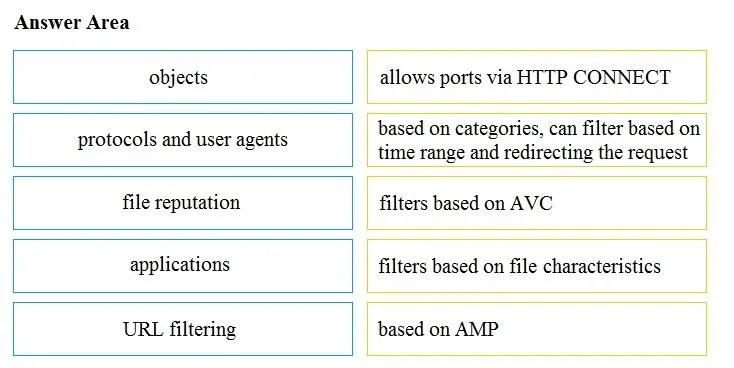
Drag and Drop Question Drag and drop the access policy options from the left onto the correct descriptions on the right. Answer:
The correct answer is application filter; MIME type filter; malware scanning; URL category; custom URL category. This question assesses the test-taker's understanding of various network access policy options and their specific functionalities within a security context, requiring accurate matching of policy types to their descriptions.
Question
Exhibit
Answer Area
Drag items
Correct arrangement
- application filter
- MIME type filter
- malware scanning
- URL category
- custom URL category
Explanation
This question assesses the test-taker's understanding of various network access policy options and their specific functionalities within a security context, requiring accurate matching of policy types to their descriptions.
Approach. The user must drag each access policy option from the left column to its correct corresponding description in the right column, as depicted in Image 1.
- objects should be dragged to allows ports via HTTP CONNECT. In network security, 'objects' often define network entities, services, or ports. Allowing 'ports via HTTP CONNECT' is a specific proxy or firewall configuration for tunneling, which would be managed through defining such a service or object.
- protocols and user agents should be dragged to filters based on AVC. Application Visibility and Control (AVC) relies on inspecting various traffic attributes, including network protocols and specific user agent strings, to accurately identify and control applications.
- file reputation should be dragged to based on AMP. Advanced Malware Protection (AMP) extensively utilizes file reputation services to determine the trustworthiness of files, allowing it to block known malicious content.
- applications should be dragged to filters based on file characteristics. While 'applications' is often closely related to AVC, in comprehensive security systems, application control can also involve enforcing policies based on the characteristics of files associated with or transferred by an application (e.g., blocking certain file types or executables).
- URL filtering should be dragged to based on categories, can filter based on time range and redirecting the request. This description perfectly encapsulates the core functionalities of URL filtering, which categorizes websites, allows for time-based access policies, and can redirect users upon blocking.
Common mistakes.
- common_mistake. A common mistake would be to directly map 'applications' to 'filters based on AVC', as AVC is fundamentally about application control. However, the correct mapping in this question links 'protocols and user agents' to 'filters based on AVC', suggesting that AVC's mechanism relies on protocols and user agents. Another mistake could be confusing 'file reputation' with 'filters based on file characteristics'; file reputation (AMP) is about a file's known threat level, while file characteristics (like type, size, or hash) are attributes used for different filtering purposes, often related to content control or DLP. Misinterpreting 'objects' as a generic term rather than specific network or service definitions (like allowing HTTP CONNECT) would also lead to an incorrect match.
Concept tested. Understanding of various network security policy components and features, including object-based policies, application visibility and control (AVC), advanced malware protection (AMP) with file reputation, application control, and URL filtering mechanisms.
Topics
Community Discussion
No community discussion yet for this question.