
300-725 · Question #25
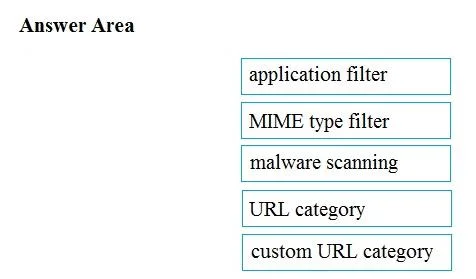
Drag and Drop Question Drag and drop the Cisco WSA access policy elements from the left into the order in which they are processed on the right. Answer:
The correct answer is Client sends a hello message to Cisco WSA; Client sends the session key, which is encrypted by using public key of the server certificate; Encryption data channel is established; Cisco WSA replies with a proxied certificate of the destination server to the client; Server replies with server certificate to Cisco WSA. The correct interaction is to drag and drop the Cisco WSA access policy elements into the logical processing order: custom URL category, URL category, application filter, MIME type filter, and finally malware scanning.
Question
Drag and Drop Question Drag and drop the Cisco WSA access policy elements from the left into the order in which they are processed on the right. Answer:
Exhibit
Answer Area
Drag items
Correct arrangement
- Client sends a hello message to Cisco WSA
- Client sends the session key, which is encrypted by using public key of the server certificate
- Encryption data channel is established
- Cisco WSA replies with a proxied certificate of the destination server to the client
- Server replies with server certificate to Cisco WSA
Explanation
The correct interaction is to drag and drop the Cisco WSA access policy elements into the logical processing order: custom URL category, URL category, application filter, MIME type filter, and finally malware scanning.
Approach. The correct interaction requires ordering the policy elements based on the typical processing flow of a Cisco Web Security Appliance (WSA) or similar web proxy:
- custom URL category (action 1): Custom, user-defined URL categories are usually evaluated first because they are the most specific and take precedence over broader categories.
- URL category (action 2): Standard, vendor-defined URL categories are checked next, after custom categories have been processed.
- application filter (action 3): Application-level filtering inspects the application protocol and usage, which typically occurs after the initial URL categorization.
- MIME type filter (action 4): MIME type filtering inspects the content-type headers of the data being transferred, which happens during the content inspection phase.
- malware scanning (action 5): Malware scanning is typically the final and most resource-intensive step, where the actual content payload is inspected for viruses, spyware, and other malicious threats, after all other filtering criteria have been applied.
Common mistakes.
- common_mistake. Common mistakes include incorrectly ordering custom URL categories versus standard URL categories (custom being more specific should come first), placing content inspection steps like malware scanning or MIME type filtering too early (they are resource-intensive and occur later in the flow), or confusing the sequence of application filters and MIME type filters. For example, placing malware scanning before URL categorization would be inefficient and logically incorrect, as the appliance needs to determine if the URL itself is allowed before scanning its content.
Concept tested. The underlying technical concept being tested is the understanding of the policy processing order within a Cisco Web Security Appliance (WSA) or general web proxy security architecture. This includes knowing the precedence of different filtering mechanisms (e.g., specific vs. general URL categories, application vs. content inspection) and the logical flow of security checks for web traffic.
Topics
Community Discussion
No community discussion yet for this question.