
300-725 · Question #23
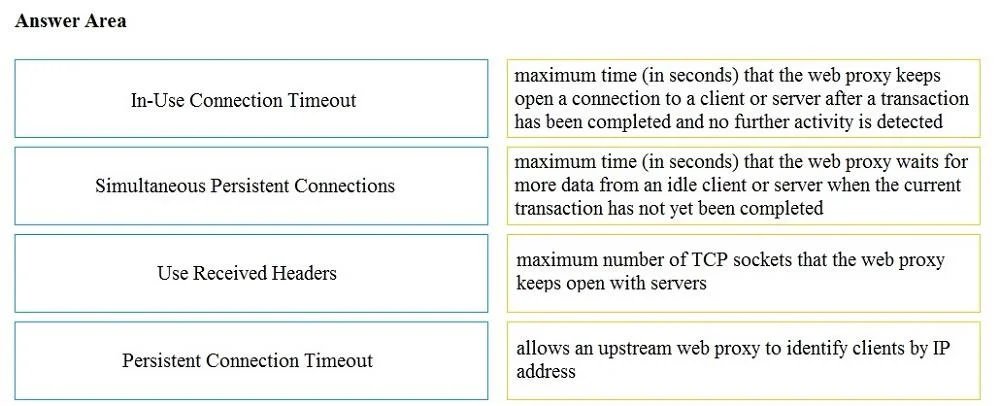
Drag and Drop Question Drag and drop the properties from the left onto the correct advanced web proxy setting descriptions on the right. Answer:
The correct answer is WCCP; PBR; PAC; WPAD. This drag-and-drop question tests knowledge of advanced web proxy settings related to connection management and client identification by requiring the test-taker to match properties with their correct definitions.
Question
Exhibit
Answer Area
Drag items
Correct arrangement
- WCCP
- PBR
- PAC
- WPAD
Explanation
This drag-and-drop question tests knowledge of advanced web proxy settings related to connection management and client identification by requiring the test-taker to match properties with their correct definitions.
Approach. The correct interaction involves dragging each property from the left (or the source list) to its accurate definition on the right. Here are the correct pairings and their rationale:
-
In-Use Connection Timeout should be dragged to: 'maximum time (in seconds) that the web proxy waits for more data from an idle client or server when the current transaction has not yet been completed'. This timeout specifically applies when a connection is established and a transaction is in progress, but the client or server stops sending data, indicating an idle state during the transaction.
-
Simultaneous Persistent Connections should be dragged to: 'maximum number of TCP sockets that the web proxy keeps open with servers'. This setting directly controls the quantity of concurrent TCP connections (sockets) that the proxy maintains with backend servers for performance and reusability, which are known as persistent (or keep-alive) connections.
-
Use Received Headers should be dragged to: 'allows an upstream web proxy to identify clients by IP address'. When this setting is enabled, the proxy examines incoming HTTP headers (like X-Forwarded-For) from a previous proxy to determine the original client's IP address, rather than just the immediate upstream proxy's IP.
-
Persistent Connection Timeout should be dragged to: 'maximum time (in seconds) that the web proxy keeps open a connection to a client or server after a transaction has been completed and no further activity is detected'. This timeout dictates how long an idle persistent connection (a keep-alive connection) remains open after a complete HTTP transaction, waiting for a new request on the same connection before closing it.
Common mistakes.
- common_mistake. A common mistake is confusing 'In-Use Connection Timeout' with 'Persistent Connection Timeout'. The 'In-Use' timeout applies when a transaction is active but stalled, while the 'Persistent' timeout applies to a connection that is idle after a transaction is complete, waiting for a subsequent transaction. Another mistake might be incorrectly associating 'Simultaneous Persistent Connections' with a time-based setting instead of a count, or misinterpreting 'Use Received Headers' as a security setting rather than a client identification mechanism in a chained proxy environment.
Concept tested. This question tests the candidate's understanding of advanced web proxy configuration settings, specifically concerning connection management (idle timeouts, persistent connection limits, and persistent connection timeouts) and client identification in proxy chains through HTTP headers.
Reference. null
Topics
Community Discussion
No community discussion yet for this question.