
300-715 · Question #260
Drag and Drop Question An engineer needs to export a file in CSV format, encrypted with the password C1$c0438563935, and contains users currently configured in Cisco ISE. Drag and drop the steps…
The correct answer is Click Administration, and then click Identity Management.; Click Identities, click Users, and then select the list of users.; Click Export Selected, click Key, and enter the password.; Click Start Export, and then click OK. To export encrypted user data from Cisco ISE, first navigate to Identity Management, select the users, configure the export with encryption and password, then start the export process.
Question
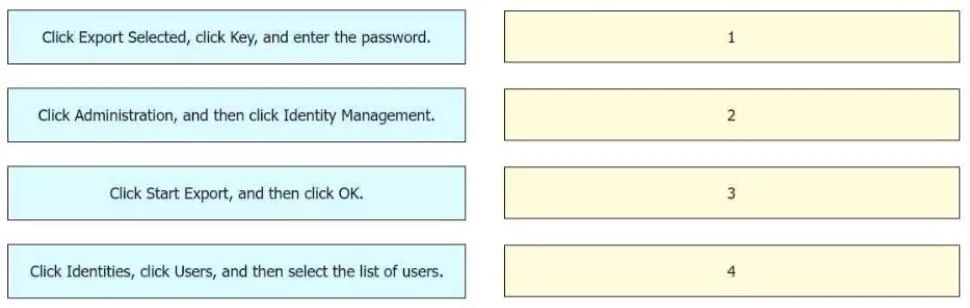
Drag and Drop Question An engineer needs to export a file in CSV format, encrypted with the password C1$c0438563935, and contains users currently configured in Cisco ISE. Drag and drop the steps from the left into the sequence on the right to complete this task. Answer:
Exhibit
Answer Area
Drag items
Correct arrangement
- Click Administration, and then click Identity Management.
- Click Identities, click Users, and then select the list of users.
- Click Export Selected, click Key, and enter the password.
- Click Start Export, and then click OK.
Explanation
To export encrypted user data from Cisco ISE, first navigate to Identity Management, select the users, configure the export with encryption and password, then start the export process.
Approach. The task is to export users from Cisco ISE in CSV format, encrypted with a specific password. This requires a sequential set of actions within the Cisco ISE administrative interface:
-
Click Administration, and then click Identity Management. This is the initial navigation step to reach the section where user identities are managed.
-
Click Identities, click Users, and then select the list of users. Once in 'Identity Management', the next logical step is to locate and select the specific users or the entire list of users that need to be exported.
-
Click Export Selected, click Key, and enter the password. After selecting the users, the 'Export Selected' option is typically used to initiate the export process. The question explicitly states the file needs to be 'encrypted with the password C1$c0438563935', so enabling encryption (via 'Key' option) and entering the specified password is the necessary configuration step.
-
Click Start Export, and then click OK. This is the final action to confirm the export settings and begin the actual export operation, typically followed by an 'OK' or 'Confirm' button.
Common mistakes.
- common_mistake. A common mistake would be to misorder the steps, for example, attempting to 'Start Export' before selecting users or configuring encryption, or trying to 'Export Selected' before navigating to the correct administrative section. Failing to include the encryption key step would also be incorrect given the requirement for an encrypted export. Any deviation from the logical flow of navigation, selection, configuration, and execution would lead to an incorrect answer, as the Cisco ISE portal requires these steps in a specific order.
Concept tested. The core concept being tested is the practical knowledge of navigating and performing administrative tasks within Cisco Identity Services Engine (ISE), specifically exporting user data with encryption. This demonstrates an understanding of the ISE user interface, data management, and security features related to data export.
Topics
Community Discussion
No community discussion yet for this question.