
300-715 · Question #15
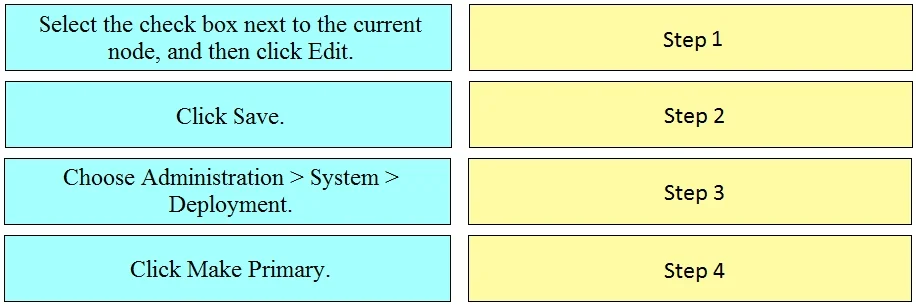
Drag and Drop Question Drag the steps to configure a Cisco ISE node as a primary administration node from the left into the correct order on the night. Answer:
The correct answer is Select the check box next to the current node, and then click Edit.; Choose Administration > System > Deployment.; Click Make Primary.; Click Save. The steps to configure a Cisco ISE node as a primary administration node involve navigating to the deployment settings, editing the node, designating it as primary, and then saving the changes.
Question
Exhibit
Answer Area
Drag items
Correct arrangement
- Select the check box next to the current node, and then click Edit.
- Choose Administration > System > Deployment.
- Click Make Primary.
- Click Save.
Explanation
The steps to configure a Cisco ISE node as a primary administration node involve navigating to the deployment settings, editing the node, designating it as primary, and then saving the changes.
Approach. The correct interaction is to drag the blue step boxes into the yellow target boxes in the following sequence:
- Drag 'Choose Administration > System > Deployment.' to 'Step 1'. This is the initial navigation path in the Cisco ISE graphical user interface (GUI) to access the deployment settings where node configurations are managed.
- Drag 'Select the check box next to the current node, and then click Edit.' to 'Step 2'. Once on the Deployment page, the specific node whose role is to be changed needs to be selected and its configuration opened for modification.
- Drag 'Click Make Primary.' to 'Step 3'. Inside the node's edit configuration panel, there will be an option or button to designate the selected node as the primary administration node.
- Drag 'Click Save.' to 'Step 4'. After making any configuration changes in Cisco ISE, or most management interfaces, it is crucial to save the changes for them to be applied and take effect.
Common mistakes.
- common_mistake. A common mistake would be to place 'Click Save.' before 'Click Make Primary.' or to attempt to make a node primary before navigating to the correct configuration section and selecting the node. Saving prematurely would mean the 'Make Primary' action has not yet been registered, or attempting actions out of context would lead to an error or the inability to perform the desired action. For example, trying to 'Click Make Primary' before 'Select the check box next to the current node, and then click Edit' is impossible, as the option would not be available or applicable without a selected node being in edit mode.
Concept tested. The core concept tested is the understanding of Cisco Identity Services Engine (ISE) deployment administration, specifically the procedural steps for configuring or changing a node's role, such as designating a node as the primary administration node, which is a fundamental aspect of managing distributed ISE deployments and ensuring high availability.
Topics
Community Discussion
No community discussion yet for this question.