
300-510 · Question #57
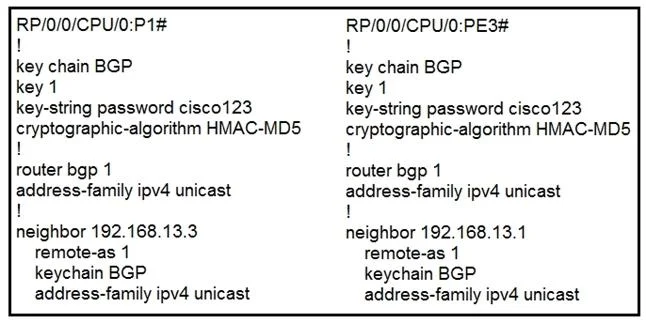
Refer to the exhibit. P1 and PE3 Cisco IOS XR routers are directly connected and have this configuration applied. The BGP session is not coming up. Assume that there is no IP reachability problem…
The correct answer is B. Configure the send and accept lifetime under key 1. On Cisco IOS XR, when a key chain is configured for BGP MD5 authentication, each key must have an explicitly configured send-lifetime and accept-lifetime. Without these lifetime settings, the key is not considered active/valid by the router, and the authentication will fail…
Question
Refer to the exhibit. P1 and PE3 Cisco IOS XR routers are directly connected and have this configuration applied. The BGP session is not coming up. Assume that there is no IP reachability problem and both routers can open tcp port 179 to each other. Which action fixes the issue?
Exhibit
Options
- AChange HMAC-MD5 to HMAC-SHA1-20
- BConfigure the send and accept lifetime under key 1
- CChange HMAC-MD5 to MD5
- DChange HMAC-MD5 to HMAC-SHA1-12
How the community answered
(59 responses)- A3% (2)
- B85% (50)
- C3% (2)
- D8% (5)
Explanation
On Cisco IOS XR, when a key chain is configured for BGP MD5 authentication, each key must have an explicitly configured send-lifetime and accept-lifetime. Without these lifetime settings, the key is not considered active/valid by the router, and the authentication will fail even if the key string and algorithm are correct - preventing the BGP TCP session from being established. Configuring the send and accept lifetime (e.g., to 'infinite' or a specific range) activates the key and allows BGP authentication to succeed. Option A is wrong because the algorithm type is not the issue. Option C is wrong because HMAC-MD5 is the correct IOS XR syntax (not plain MD5). Option D is wrong because changing the algorithm does not address the missing lifetime configuration.
Topics
Community Discussion
No community discussion yet for this question.