
300-510 · Question #258
SIMULATION Guidelines This is a lab item in which tasks will be performed on virtual devices. - Refer to the Tasks tab to view the tasks for this lab item. - Refer to the Topology tab to access the…
The correct answer is D. It identifies the autonomous system that belongs to the confederation. In BGP confederations, a large AS is subdivided into smaller member autonomous systems (sub-ASes) to reduce the IBGP full-mesh requirement. The 'bgp confederation peers' command is used to declare which AS numbers are members (peers) of the same confederation. The correct…
Question
Exhibit
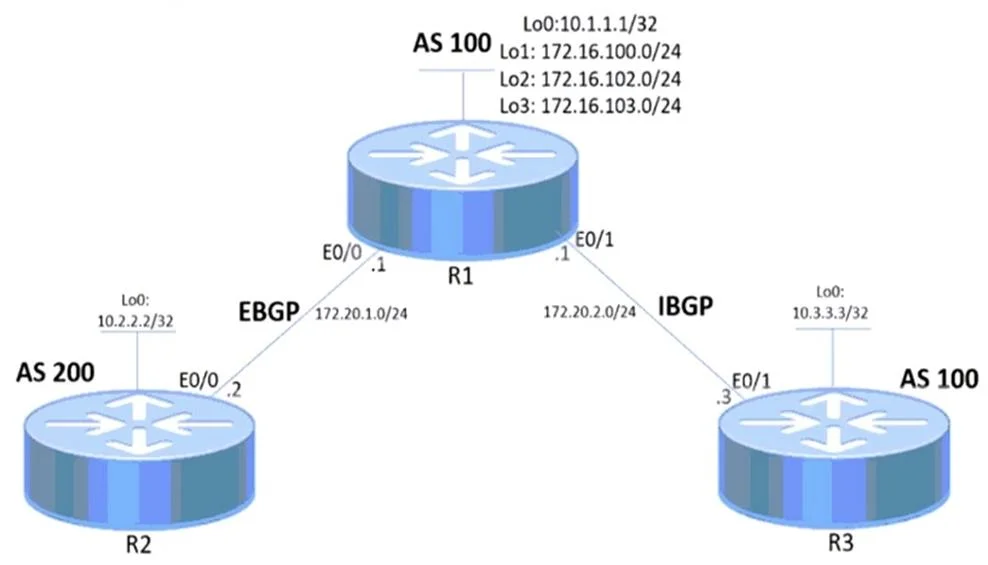
Options
- AIt reflects the route reflector cluster ID within the confederation.
- BIt carries the AS number within the confederation's local autonomous system.
- CIt advertises routes outside of the confederation's autonomous system.
- DIt identifies the autonomous system that belongs to the confederation.
How the community answered
(57 responses)- A4% (2)
- B12% (7)
- C7% (4)
- D77% (44)
Explanation
In BGP confederations, a large AS is subdivided into smaller member autonomous systems (sub-ASes) to reduce the IBGP full-mesh requirement. The 'bgp confederation peers' command is used to declare which AS numbers are members (peers) of the same confederation. The correct answer D - 'It identifies the autonomous system that belongs to the confederation' - describes exactly what this configuration does: it tells a router which neighboring AS numbers are part of the same confederation, so those AS numbers are stripped from the AS_PATH attribute before advertising routes externally. Option A is incorrect because route reflector cluster IDs are a separate IBGP mechanism unrelated to confederation membership. Option B is incorrect because the confederation identifier (not peers) represents the external-facing AS. Option C is incorrect because this command is about internal confederation membership, not external advertisement.
Topics
Community Discussion
No community discussion yet for this question.