
300-510 · Question #11
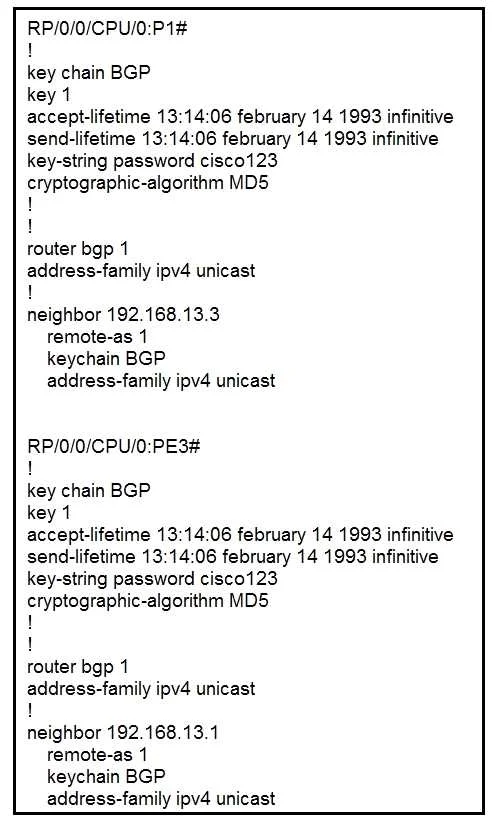
Refer to the exhibit. P1 and PE3 Cisco IOS XR routers are directly connected and have this configuration applied. The BGP session is not coming up. Assume that there is no IP reachability problem…
The correct answer is A. Change MD5 to HMAC-SHA1-12 D. Change MD5 to HMAC-MD5. Cisco IOS XR keychain-based BGP authentication does not support a raw 'MD5' algorithm name. The valid cryptographic algorithm options for IOS XR keychains are HMAC-MD5 and HMAC-SHA1-12 (among others like AES-128-CMAC-96). Using just 'MD5' is an invalid algorithm identifier on…
Question
Refer to the exhibit. P1 and PE3 Cisco IOS XR routers are directly connected and have this configuration applied. The BGP session is not coming up. Assume that there is no IP reachability problem and both routers can open tcp port 179 to each other. Which two actions fix the issue? (Choose two.)
Exhibit
Options
- AChange MD5 to HMAC-SHA1-12
- BChange MD5 to HMAC-ESP
- CChange MD5 to SHA-1
- DChange MD5 to HMAC-MD5
- ERemove the send and accept lifetime under key 1
How the community answered
(56 responses)- A73% (41)
- B4% (2)
- C18% (10)
- E5% (3)
Explanation
Cisco IOS XR keychain-based BGP authentication does not support a raw 'MD5' algorithm name. The valid cryptographic algorithm options for IOS XR keychains are HMAC-MD5 and HMAC-SHA1-12 (among others like AES-128-CMAC-96). Using just 'MD5' is an invalid algorithm identifier on IOS XR, which prevents the BGP session from authenticating and coming up. Changing the algorithm to HMAC-MD5 (option D) or HMAC-SHA1-12 (option A) corrects the keychain algorithm to a supported value. HMAC-ESP (B) is not a valid keychain algorithm for BGP, and SHA-1 (C) alone is also not supported in this context.
Topics
Community Discussion
No community discussion yet for this question.