
300-430 · Question #210
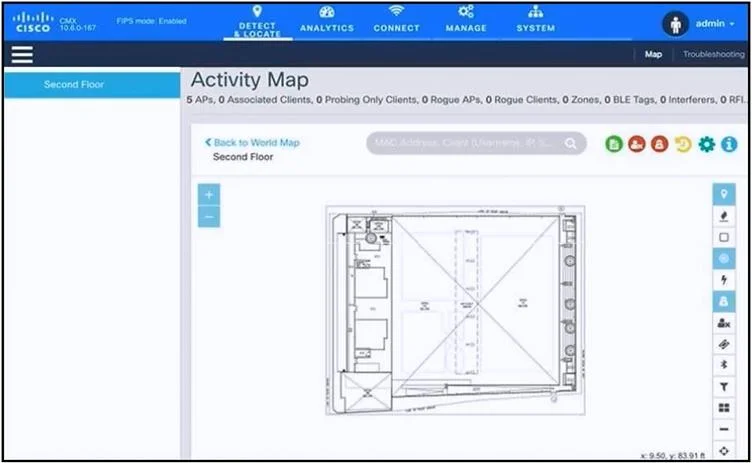
Refer to the exhibit. An engineer has deployed the Cisco CMX solution to track and detect the number of users who visit the office each day. The CMX dashboard is not showing any data. Which action…
The correct answer is B. Add the WLCs to CMX. The issue with the Cisco CMX dashboard not showing any data can be resolved by integrating the Wireless LAN Controllers (WLCs) with the CMX system. The CMX solution relies on data from the WLCs to track and detect users' presence in the office area. Without the WLCs being added…
Question
Refer to the exhibit. An engineer has deployed the Cisco CMX solution to track and detect the number of users who visit the office each day. The CMX dashboard is not showing any data. Which action resolves this issue?
Exhibit
Options
- AConfigure Single Sign-On authentication.
- BAdd the WLCs to CMX.
- CCopy the exported Maps from CMX server to PI using SCP.
- DInstall an evaluation license to CMX server.
How the community answered
(41 responses)- B90% (37)
- C2% (1)
- D7% (3)
Explanation
The issue with the Cisco CMX dashboard not showing any data can be resolved by integrating the Wireless LAN Controllers (WLCs) with the CMX system. The CMX solution relies on data from the WLCs to track and detect users' presence in the office area. Without the WLCs being added to CMX, the system cannot collect the necessary analytics and location data for its
Topics
Community Discussion
No community discussion yet for this question.