
300-370 · Question #45
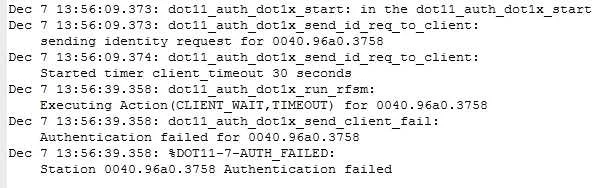
Refer to the exhibit. A client reports being unable to log into the wireless network, which uses PEAPv2. Which two issues appear in the output? (Choose two)
The correct answer is B. There is a problem with the client supplicant E. The EAP client timeout value should be increased. The troubleshooting output indicates a problem with the client supplicant, suggesting it is not responding correctly to authentication challenges, and that the EAP client timeout value should be increased.
Question
Refer to the exhibit. A client reports being unable to log into the wireless network, which uses PEAPv2. Which two issues appear in the output? (Choose two)
Exhibit
Options
- AThe AP has the incorrect RADIUS server address
- BThere is a problem with the client supplicant
- CThe AP has lost IP connectivity to the authentication server
- DThe authentic at ion server is misconfigured on the controller
- EThe EAP client timeout value should be increased
- FThe authentication server is misconfigured in the WLAN
How the community answered
(59 responses)- A5% (3)
- B81% (48)
- C8% (5)
- D3% (2)
- F2% (1)
Why each option
The troubleshooting output indicates a problem with the client supplicant, suggesting it is not responding correctly to authentication challenges, and that the EAP client timeout value should be increased.
The exhibit does not provide specific details to conclude that the AP has an incorrect RADIUS server address, as authentication attempts are reaching a server and resulting in EAP-related issues.
A problem with the client supplicant is indicated if the client is failing PEAPv2 authentication and potentially not responding or processing authentication challenges correctly. This often manifests as authentication failures or incomplete EAP message exchanges due to client-side misconfiguration or software issues.
There is no indication in the output that the AP has lost IP connectivity to the authentication server; such an issue would typically show server unreachable errors.
While an authentication server misconfiguration on the controller could cause issues, the symptoms of a client supplicant problem and EAP timeout point more specifically to client-side interaction or timing rather than general server configuration.
The EAP client timeout value should be increased if the client is not responding within the configured timeframe, leading to authentication failures. Increasing this timeout allows the client more time to process requests and send responses, which can resolve issues related to network latency or slow client processing during the EAP exchange.
A general misconfiguration of the authentication server in the WLAN might cause failures, but the reported issues specifically highlight client supplicant behavior and timeout problems, narrowing the focus.
Concept tested: PEAPv2 authentication troubleshooting, EAP timeout
Topics
Community Discussion
No community discussion yet for this question.