
300-370 · Question #12
Refer to the exhibit. Employees upgraded company issued OS devices. Which are configured to authenticate to the network using WPA2-Eniefpnse 802 lx with LEAP As a result, the devices are no longer…
The correct answer is E. Deploy a new configuration profile with LEAP enabled. When OS devices upgraded and can no longer authenticate using WPA2-Enterprise 802.1x with LEAP, it indicates that the upgrade likely removed or disabled LEAP support. The engineer must deploy a new configuration profile specifically enabling LEAP to restore authentication.
Question
Refer to the exhibit. Employees upgraded company issued OS devices. Which are configured to authenticate to the network using WPA2-Eniefpnse 802 lx with LEAP As a result, the devices are no longer able to authenticate. Which action must the engineer do 10 resolve the issue?
Exhibit
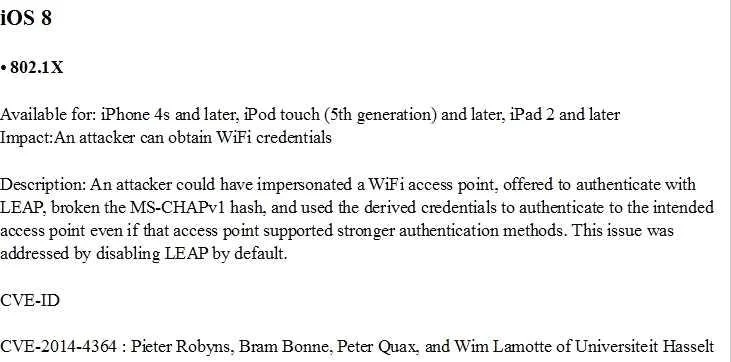
Options
- ARedeploy the existing configuration profile.
- BChange LEAP certificate on the ACS server.
- CReset the network settings on the devices.
- DRejoin the enterprise network manually.
- EDeploy a new configuration profile with LEAP enabled
How the community answered
(43 responses)- A9% (4)
- C2% (1)
- D7% (3)
- E81% (35)
Why each option
When OS devices upgraded and can no longer authenticate using WPA2-Enterprise 802.1x with LEAP, it indicates that the upgrade likely removed or disabled LEAP support. The engineer must deploy a new configuration profile specifically enabling LEAP to restore authentication.
Redeploying the existing configuration profile is unlikely to work if the OS upgrade has fundamentally altered the device's support or default behavior for the LEAP protocol.
LEAP (Lightweight Extensible Authentication Protocol) is a password-based protocol and does not use certificates for authentication; therefore, changing a LEAP certificate on an ACS server is irrelevant.
Resetting the network settings on the devices would clear their current network configurations but would not automatically re-enable LEAP support, which is likely disabled by the OS upgrade.
Manually rejoining the enterprise network would require configuring the LEAP settings individually on each device, which is inefficient and does not address the underlying issue of LEAP being disabled by the OS upgrade.
OS upgrades often remove or disable support for older, less secure authentication protocols like LEAP by default. To resolve the authentication issue, a new configuration profile must be deployed to the devices that explicitly re-enables or configures LEAP for 802.1x authentication.
Concept tested: LEAP authentication compatibility after OS upgrade
Source: https://www.cisco.com/c/en/us/td/docs/wireless/controller/8-5/config-guide/b_cg85/wlan_security.html#concept_350212E53E2A4F23880482B6E302E4E7
Topics
Community Discussion
No community discussion yet for this question.