
300-365 · Question #149
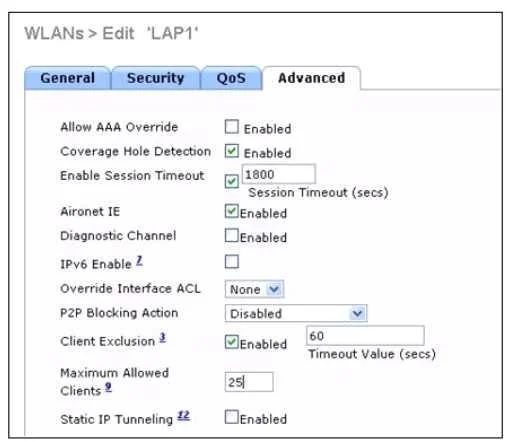
Refer to the exhibit. To which setting is the client limitation for WLAN LAP1 configured?
The correct answer is D. 25. The exhibit shows the per-AP per-WLAN maximum client limit for WLAN LAP1 is configured to 25, which is distinct from the client exclusion timeout and other timer values visible on the same page.
Question
Refer to the exhibit. To which setting is the client limitation for WLAN LAP1 configured?
Exhibit
Options
- A60
- B1800
- CClient exclusion is not enabled
- D25
How the community answered
(31 responses)- A6% (2)
- B3% (1)
- C3% (1)
- D87% (27)
Why each option
The exhibit shows the per-AP per-WLAN maximum client limit for WLAN LAP1 is configured to 25, which is distinct from the client exclusion timeout and other timer values visible on the same page.
60 does not represent the client association limit for WLAN LAP1; it corresponds to a different timer or threshold shown elsewhere on the configuration page.
1800 seconds is the default client exclusion timeout value, which controls how long an excluded client is blocked, not the maximum number of allowed clients.
Client exclusion is a separate blocking feature; the exhibit shows that a specific numeric client limit is configured, meaning the limitation is active and this option is factually incorrect.
The maximum clients per AP per WLAN field controls how many clients can simultaneously associate to a specific WLAN on a given AP, and the exhibit shows this value is set to 25 for LAP1. This setting is configured under the advanced WLAN or AP override settings and is the direct answer to what the client limitation is. The other numeric values on the page correspond to different parameters such as the exclusion timeout.
Concept tested: Cisco WLC per-AP per-WLAN maximum client association limit
Source: https://www.cisco.com/c/en/us/td/docs/wireless/controller/8-10/config-guide/b_cg810/configuring_wlans.html
Topics
Community Discussion
No community discussion yet for this question.