
300-170 · Question #83
Refer to the exhibit. Which two actions do you perform on the remote switch before you run the commands? (Choose two )
The correct answer is A. Configure a minimum of eight links in the port channel D. Configure the remote switch for NPV. Before configuring a remote switch for N-Port Virtualization (NPV), the NPV feature must be enabled, and its uplinks to the core switch should be part of a robust port channel.
Question
Refer to the exhibit. Which two actions do you perform on the remote switch before you run the commands? (Choose two )
Exhibit
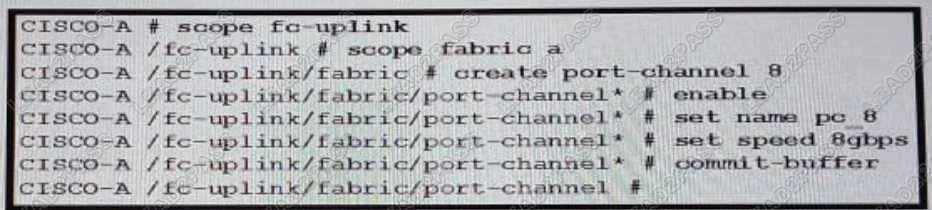
Options
- AConfigure a minimum of eight links in the port channel
- BConfigure the remote switch to use NPIV mode
- CSet the port channel mode to on
- DConfigure the remote switch for NPV.
- EEnable the fport-channel-trunk feature
How the community answered
(24 responses)- A83% (20)
- B4% (1)
- C8% (2)
- E4% (1)
Why each option
Before configuring a remote switch for N-Port Virtualization (NPV), the NPV feature must be enabled, and its uplinks to the core switch should be part of a robust port channel.
Cisco best practices for Fibre Channel NPV deployments, especially when connecting an NPV switch to Cisco UCS Fabric Interconnects, recommend configuring port channels with a minimum of eight links for optimal performance, bandwidth, and redundancy.
An NPV switch connects to an upstream NPIV-enabled switch but does not itself operate in NPIV mode; NPIV is for the upstream device.
Setting a port channel mode to 'on' (unconditional bundling) is generally not recommended for Fibre Channel port channels and lacks negotiation, making it an unsuitable choice for reliable SAN connectivity.
Before any other configuration related to N-Port Virtualization (NPV), the `feature npv` command must be executed on the remote switch to enable the NPV functionality, allowing it to act as an edge device to an upstream NPIV switch.
The `fport-channel-trunk` feature is enabled on the *upstream* NPIV switch to allow multiple VSANs to be trunked over an F-port port-channel, not on the downstream NPV switch itself.
Concept tested: Fibre Channel NPV configuration prerequisites
Source: https://www.cisco.com/c/en/us/td/docs/switches/datacenter/mds9000/sw/nx-os/san_config/config/npv/7x/b_SAN_config_gd_7x_mds9000/b_SAN_config_gd_7x_mds9000_chapter_010.html
Topics
Community Discussion
No community discussion yet for this question.