
300-170 · Question #45
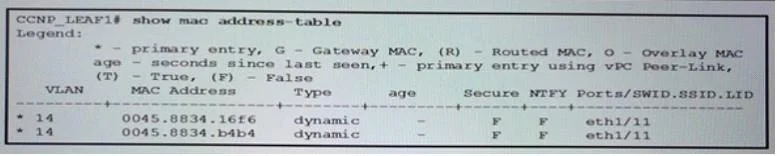
Refer to the exhibit. You are verifying connectivity within a leaf device. You attempt to connect to a destination server in VLAN 17, and you then run the show mac address-table command as shown…
The correct answer is C. The VLAN ID shown is used for identification and internal mapping within the ACI leaf. The show mac address-table output on an ACI leaf switch might display an internal VLAN ID that is different from the externally configured VLAN 17 because the ACI fabric uses internal VLAN or VXLAN encapsulations for traffic forwarding within the fabric, mapping external VLANs…
Question
Refer to the exhibit. You are verifying connectivity within a leaf device. You attempt to connect to a destination server in VLAN 17, and you then run the show mac address-table command as shown. Why does the show mac address-table output show a different VLAN?
Exhibit
Options
- AThe wrong AEP is attached to the leaf ports
- BThe VLAN configuration on the leaf switch is incorrect
- CThe VLAN ID shown is used for identification and internal mapping within the ACI leaf
- DWhen traffic appears, the Cisco ACI marks ports with VLAN 17
How the community answered
(45 responses)- A20% (9)
- B7% (3)
- C69% (31)
- D4% (2)
Why each option
The show mac address-table output on an ACI leaf switch might display an internal VLAN ID that is different from the externally configured VLAN 17 because the ACI fabric uses internal VLAN or VXLAN encapsulations for traffic forwarding within the fabric, mapping external VLANs to internal identifiers.
An incorrect AEP (Attachable Access Entity Profile) would likely result in no connectivity or traffic being dropped, not a different VLAN appearing in the MAC address table.
While incorrect VLAN configuration could cause issues, the question implies traffic is seen, and the display of a different VLAN is a characteristic of ACI's internal mapping, not necessarily an incorrect configuration.
In Cisco ACI, external VLANs (like VLAN 17) are often mapped to internal VLANs or VXLAN Network Identifiers (VNIs) for forwarding traffic within the fabric. The show mac address-table command on a leaf switch may display these internal identifiers rather than the original external VLAN ID.
ACI does not mark ports with the external VLAN ID (VLAN 17) when traffic appears; rather, it uses internal encapsulation for fabric forwarding.
Concept tested: ACI internal VLAN to VNI mapping
Source: https://www.cisco.com/c/en/us/td/docs/dcn/aci/apic/6x/config/layer2/cisco-aci-layer2-configuration-guide-60x/m_vlan_vxlan_encap.html
Topics
Community Discussion
No community discussion yet for this question.