
2V0-622D · Question #176
In a vSphere environment, two resource pools are created as shown in the Exhibit. Each VM is configured with 1 GB of memory. When the administrator tried to power on VM3, the operation failed. What…
The correct answer is A. Increase Memory Reservation. When a VM fails to power on due to insufficient memory in a resource pool, increasing the Memory Reservation on the resource pool provides the guaranteed physical memory required for the VM to start.
Question
In a vSphere environment, two resource pools are created as shown in the Exhibit. Each VM is configured with 1 GB of memory. When the administrator tried to power on VM3, the operation failed. What action in the resource pool settings will allow VM3 to power on successfully?
Exhibit
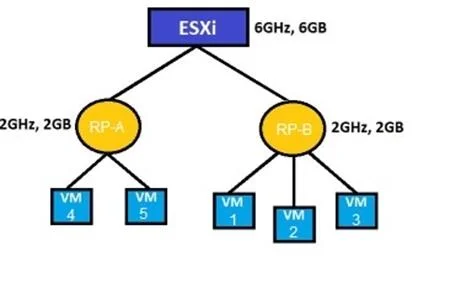
Options
- AIncrease Memory Reservation.
- BDeselect Expandable Memory Reservation
- CIncrease the CPU Reservation
- DDeselect Expandable CPU Reservation.
How the community answered
(28 responses)- A54% (15)
- B7% (2)
- C14% (4)
- D25% (7)
Why each option
When a VM fails to power on due to insufficient memory in a resource pool, increasing the Memory Reservation on the resource pool provides the guaranteed physical memory required for the VM to start.
In vSphere resource pools, each VM requires a memory reservation to power on; if the pool's total reservation is exhausted and no additional memory can be borrowed from the parent pool, new VMs fail to start. Increasing the Memory Reservation on the resource pool guarantees sufficient physical memory is committed, allowing VM3 to power on successfully.
Deselecting Expandable Memory Reservation removes the resource pool's ability to borrow memory from its parent pool, further restricting available memory and making it harder - not easier - for VM3 to power on.
Increasing CPU Reservation only affects processor resource allocation and has no bearing on the memory shortage that is preventing VM3 from powering on.
Deselecting Expandable CPU Reservation limits CPU borrowing from the parent pool, which does not address the memory-related failure preventing VM3 from powering on.
Concept tested: vSphere resource pool memory reservation for VM power-on
Source: https://docs.vmware.com/en/VMware-vSphere/7.0/com.vmware.vsphere.resmgmt.doc/GUID-60077B40-66FF-4625-934A-641703ED7601.html
Topics
Community Discussion
No community discussion yet for this question.