
2V0-622 · Question #210
Refer to the Exhibit. Which tab shows the Hardware Acceleration support status?
The correct answer is A. Devices. In vSphere datastore properties, the Devices tab displays Hardware Acceleration (VAAI) support status for underlying storage devices.
Question
Refer to the Exhibit. Which tab shows the Hardware Acceleration support status?
Exhibit
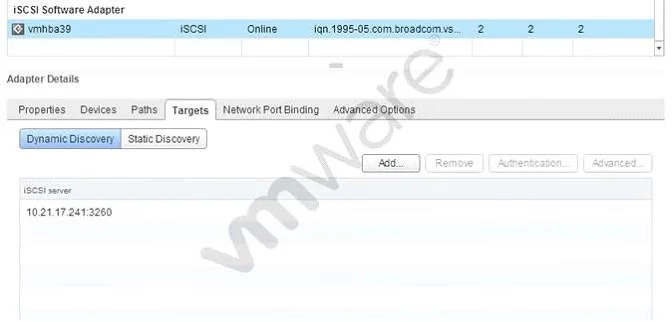
Options
- ADevices
- BProperties
- CPaths
- DAdvanced Options
How the community answered
(29 responses)- A90% (26)
- B3% (1)
- D7% (2)
Why each option
In vSphere datastore properties, the Devices tab displays Hardware Acceleration (VAAI) support status for underlying storage devices.
The Devices tab in a datastore's properties dialog lists the physical storage devices backing the datastore, including a Hardware Acceleration column that reports whether VAAI (vStorage APIs for Array Integration) is Supported, Not Supported, or Unknown for each device. This is the only tab that surfaces per-device offload capability status directly.
The Properties tab shows general datastore attributes such as name, type, capacity, and VMFS version, not hardware acceleration status.
The Paths tab displays multipathing information including path state and storage adapter details, not VAAI offload support.
The Advanced Options tab exposes configurable datastore parameters but does not report hardware acceleration capability.
Concept tested: VAAI hardware acceleration status in datastore properties
Source: https://docs.vmware.com/en/VMware-vSphere/7.0/com.vmware.vsphere.storage.doc/GUID-37E4B8F4-B234-4A3C-8D0D-0B4F857F9CA8.html
Topics
Community Discussion
No community discussion yet for this question.