
2V0-620 · Question #125
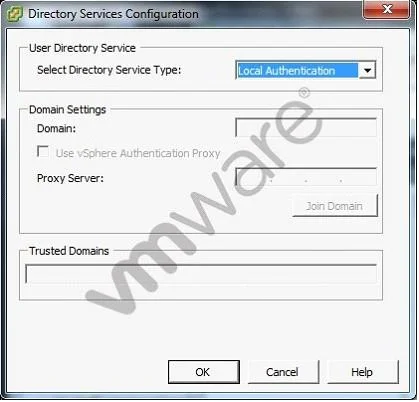
The vSphere administrator is configuring directory services for an ESXi host: What should the vSphere administrator do to configure the host to use CAM services?
The correct answer is A. Check the Use vSphere Authentication Proxy checkbox. Configuring an ESXi host to use CAM services requires enabling the vSphere Authentication Proxy option, which handles the CAM-based directory service integration.
Question
The vSphere administrator is configuring directory services for an ESXi host:
What should the vSphere administrator do to configure the host to use CAM services?
Exhibit
Options
- ACheck the Use vSphere Authentication Proxy checkbox.
- BSet Select Directory Service Type to CAM services.
- CSpecify CAM$ for the Domain.
- DSet Trusted Domains to cam\name.tld where name.tld is the domain that the host is joining.
How the community answered
(36 responses)- A92% (33)
- B3% (1)
- C6% (2)
Why each option
Configuring an ESXi host to use CAM services requires enabling the vSphere Authentication Proxy option, which handles the CAM-based directory service integration.
The 'Use vSphere Authentication Proxy' checkbox is the specific control that enables CAM (Common Authentication Method) service integration on an ESXi host. When checked, the host delegates authentication to the Authentication Proxy, which manages CAM service communication. This is the only supported mechanism for directing an ESXi host to use CAM services.
The Directory Service Type dropdown only offers options such as Active Directory and OpenLDAP - there is no 'CAM services' entry available in that field.
'CAM$' is not a valid domain name format for the Domain field; the domain field requires a fully qualified domain name like name.tld.
Trusted Domains is used to specify additional AD domains for authentication and does not accept the cam\name.tld format as a way to enable CAM services.
Concept tested: ESXi host CAM service authentication proxy configuration
Source: https://docs.vmware.com/en/VMware-vSphere/6.7/com.vmware.vsphere.security.doc/GUID-5E2EF4C3-E820-4F45-AE49-5B8A2FA18985.html
Topics
Community Discussion
No community discussion yet for this question.