
2V0-620 · Question #106
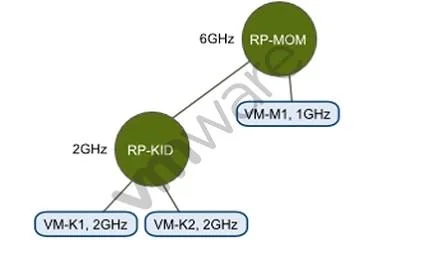
Refer to the Exhibit. An administrator has created the resource pool configuration shown in the Exhibit. Based on the exhibit, which virtual machine(s) can be successfully powered on?
The correct answer is D. VM-K1, VM-K2, and VM-M1. Based on the resource pool configuration in the exhibit, all three virtual machines - VM-K1, VM-K2, and VM-M1 - have sufficient combined resources available within their respective pools to be powered on simultaneously.
Question
Refer to the Exhibit. An administrator has created the resource pool configuration shown in the Exhibit. Based on the exhibit, which virtual machine(s) can be successfully powered on?
Exhibit
Options
- AVM-M1 only
- BVM-K1 only
- CVM-K1 and VM-K2 only
- DVM-K1, VM-K2, and VM-M1
How the community answered
(31 responses)- A29% (9)
- B13% (4)
- C10% (3)
- D48% (15)
Why each option
Based on the resource pool configuration in the exhibit, all three virtual machines - VM-K1, VM-K2, and VM-M1 - have sufficient combined resources available within their respective pools to be powered on simultaneously.
Restricting power-on to only VM-M1 is incorrect because the K resource pool has sufficient resources to allow VM-K1 and VM-K2 to also run at the same time.
Restricting power-on to only VM-K1 is incorrect because neither VM-K2 nor VM-M1 is blocked by a reservation conflict that would prevent them from starting.
Restricting power-on to VM-K1 and VM-K2 only is incorrect because the M resource pool has enough reserved capacity to allow VM-M1 to power on alongside the K-pool VMs.
In vSphere resource pool management, VMs can be powered on as long as each VM's reservation does not cause the pool's total committed reservations to exceed its own reservation or the cluster's available capacity; the exhibit shows that the K and M resource pools each have enough headroom to host their respective VMs concurrently, so all three VMs can be powered on.
Concept tested: vSphere resource pool reservation and VM power-on admission control
Source: https://docs.vmware.com/en/VMware-vSphere/6.7/com.vmware.vsphere.resmgmt.doc/GUID-60077B40-66FF-4625-934A-641703ED7601.html
Topics
Community Discussion
No community discussion yet for this question.