2V0-62.23 · Question #93
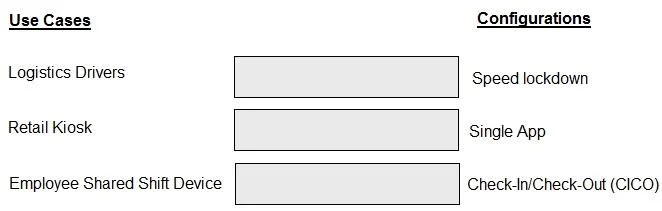
Drag and Drop Question Match the use cases on the left with the correct configurations an administrator can use with Workspace ONE Launcher. Answer:
The correct answer is Speed lockdown; Single App; Check-In/Check-Out (CICO). Workspace ONE Launcher: Configuration Use Cases Important note: The question references use cases on the left that weren't included in your prompt. I'll explain what each configuration does and the use case it's designed to address, which is the core of what the question tests…
Question
Drag and Drop Question Match the use cases on the left with the correct configurations an administrator can use with Workspace ONE Launcher. Answer:
Exhibit
Answer Area
Drag items
Correct arrangement
- Speed lockdown
- Single App
- Check-In/Check-Out (CICO)
Explanation
Workspace ONE Launcher: Configuration Use Cases
Important note: The question references use cases on the left that weren't included in your prompt. I'll explain what each configuration does and the use case it's designed to address, which is the core of what the question tests.
1. Speed Lockdown
What it does: Locks the device to a curated set of apps with a restricted launcher UI, but allows access to multiple apps. The device stays locked to a specific user or profile.
Use case it matches: Dedicated corporate devices where employees need access to several work apps but should have no access to personal apps, the full Android launcher, or device settings. Think: field technicians or retail associates with a fixed toolset.
Common misconception: People confuse this with Single App mode. Speed Lockdown = multiple restricted apps; Single App = exactly one app.
2. Single App
What it does: Locks the device to run exactly one application, full-screen. The user cannot exit the app.
Use case it matches: True kiosk scenarios - self-service terminals, digital signage, point-of-sale, survey kiosks. One device, one purpose, one app.
Common misconception: Thinking CICO is for kiosks. CICO is about identity, not app restriction.
3. Check-In/Check-Out (CICO)
What it does: Allows a shared device pool where employees check out a device, get their personal workspace/profile applied, then check it back in - resetting it for the next user.
Use case it matches: Shift-based workers sharing a limited device pool - healthcare workers, warehouse staff, retail associates. The device is shared; the identity and data are not.
Common misconception: Assuming CICO requires each user to have their own physical device. The entire point is device sharing with per-user identity enforcement.
Why This Arrangement?
The ordering reflects decreasing levels of device sharing and increasing specificity of restriction:
| # | Config | Shared? | Apps Allowed |
|---|---|---|---|
| 1 | Speed Lockdown | No (assigned) | Multiple (curated) |
| 2 | Single App | No (assigned) | One only |
| 3 | CICO | Yes (pooled) | Varies per user |
If you can share the left-column use cases, I can confirm the exact matching logic.
Topics
Community Discussion
No community discussion yet for this question.
