
2V0-62.23 · Question #92
Drag and Drop Question Order the steps for the authentication flow for Android SSO. Order responses from left to right. Answer:
The correct answer is Password (Cloud Deployment); Mobile SSO (for Android / Device Compliance); Authenticator App; Verify (Intelligent Hub); Certificate (Cloud Deployment). Android SSO Authentication Flow - Explained This question is from VMware Workspace ONE Access (formerly Identity Manager). The flow represents a chained, layered authentication policy applied to Android devices, ordered from weakest/first to strongest/last assurance. --- The…
Question
Drag and Drop Question Order the steps for the authentication flow for Android SSO. Order responses from left to right. Answer:
Exhibit
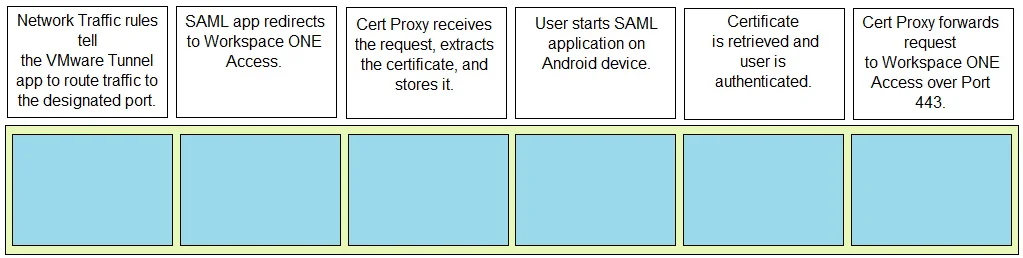
Answer Area
Drag items
Correct arrangement
- Password (Cloud Deployment)
- Mobile SSO (for Android / Device Compliance)
- Authenticator App
- Verify (Intelligent Hub)
- Certificate (Cloud Deployment)
Explanation
Android SSO Authentication Flow - Explained
This question is from VMware Workspace ONE Access (formerly Identity Manager). The flow represents a chained, layered authentication policy applied to Android devices, ordered from weakest/first to strongest/last assurance.
The Flow & Why Each Step Is Where It Is
1. Password (Cloud Deployment)
- Why first: Password is the foundational identity assertion. The user proves who they are before any device or app factors are considered. Cloud Deployment means credentials are validated against the cloud-based identity provider (e.g., Active Directory via cloud connector).
- Common mistake: Thinking certificate comes first. Certificates are a result of establishing trust, not the starting point here.
2. Mobile SSO (for Android / Device Compliance)
- Why second: After the user proves their identity, the device must prove it is enrolled and compliant. Mobile SSO for Android uses the Workspace ONE Intelligent Hub and the device's enrollment certificate to establish SSO. Crucially, it also enforces device compliance - a non-compliant device fails here before MFA is even attempted.
- Common mistake: Placing this last. It must come early because compliance is a gate, not a final check.
3. Authenticator App
- Why third: This is the first MFA factor (something you have - a TOTP code). It layers on top of the now-verified user identity and compliant device, adding a time-sensitive second factor.
- Common mistake: Swapping this with Verify. The Authenticator App (TOTP) is a lighter, non-push factor that comes before the push-based Verify step.
4. Verify (Intelligent Hub)
- Why fourth: VMware Verify via Intelligent Hub is a push notification approval step - a stronger, interactive second factor. It requires the user to actively approve a request in the Hub app. Placing it after the Authenticator App follows an escalating assurance model.
- Common mistake: Thinking Verify comes before the Authenticator App. Push-based approval is generally considered a higher-trust, more interactive step.
5. Certificate (Cloud Deployment)
- Why last: Certificate-based authentication is the strongest, most cryptographically assured method. By placing it last, it serves as the final seal of trust - binding all prior assertions (identity, device, MFA) to a cryptographic credential issued via cloud deployment.
- Common mistake: Placing this first. Certificates are the culmination of the trust chain, not the entry point in this policy design.
Key Takeaway
The ordering follows a deliberate trust escalation model:
| # | Factor Type | Assurance Level |
|---|---|---|
| 1 | Password | Something you know |
| 2 | Device + Compliance | Something you have (device) |
| 3 | Authenticator App | Something you have (TOTP) |
| 4 | Verify / Push | Interactive possession proof |
| 5 | Certificate | Cryptographic identity binding |
Each step gates the next - a failure at any point stops the chain. This is how Workspace ONE enforces zero-trust access for Android enterprise environments.
Topics
Community Discussion
No community discussion yet for this question.