2V0-62.23 · Question #100
Drag and Drop Question Match each Content Gateway error message to its potential resolution. Answer:
Important Note The question as provided is incomplete - the error messages (left side of the match) are missing. Only the resolutions (right side) were included. I'll explain the resolutions and their likely pairings based on standard VMware Workspace ONE Content Gateway / UAG…
Question
Drag and Drop Question Match each Content Gateway error message to its potential resolution. Answer:
Exhibit
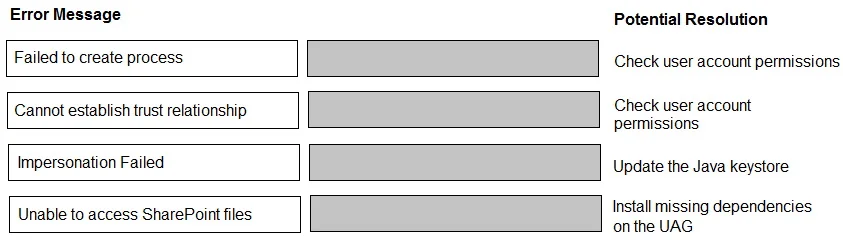
Answer Area
Drag items
Explanation
Important Note
The question as provided is incomplete - the error messages (left side of the match) are missing. Only the resolutions (right side) were included. I'll explain the resolutions and their likely pairings based on standard VMware Workspace ONE Content Gateway / UAG exam content.
Context
This question tests knowledge of VMware Content Gateway errors, typically deployed on a Unified Access Gateway (UAG). Each resolution maps to a specific class of error.
Resolution Explanations
1. Check user account permissions (appears twice - maps to two different errors)
Two distinct errors share this resolution:
- "403 Forbidden" / "Access Denied" - The authenticated user exists but lacks rights to the requested content repository. The fix is to verify group/role assignments in the directory or UEM console.
- "401 Unauthorized" - Authentication itself fails, often because the service account used by Content Gateway lacks the necessary AD/LDAP read permissions.
Common mistake: Candidates often assume these are the same error. They are not - 401 is authentication failure, 403 is authorization failure. Both resolve to permissions, but at different layers.
2. Update the Java keystore
Maps to SSL/TLS certificate errors (e.g., PKIX path building failed, SSL handshake exception).
Content Gateway runs on the JVM. When it cannot trust the backend server's certificate (self-signed or private CA), the Java keystore (cacerts) must be updated to include that CA certificate.
Common mistake: Thinking this is a network firewall issue. If the handshake itself fails, the problem is trust, not connectivity.
3. Install missing dependencies on the UAG
Maps to service startup failures or "library not found" errors.
When Content Gateway is deployed on UAG, it requires specific runtime libraries. If the UAG appliance is missing them, the Content Gateway service cannot start.
Common mistake: Assuming a reinstall of Content Gateway itself fixes this - the missing piece is at the OS/appliance dependency level, not the application package.
Summary Table
| Error Type | Resolution |
|---|---|
| 401 Unauthorized | Check user account permissions |
| 403 Forbidden / Access Denied | Check user account permissions |
| SSL/Certificate trust failure | Update the Java keystore |
| Service startup / missing library | Install missing dependencies on the UAG |
If you have the actual error message text from your exam, share it and I can give a precise mapping.
Topics
Community Discussion
No community discussion yet for this question.
