
2V0-51.19 · Question #15
Review the exhibit. While a View administrator is configuring the vRealize for Horizon Broker Agent, the error message in the exhibit is displayed. What two actions should the administrator take to…
The correct answer is A. Configure the firewall to allow communications C. Verify that the pairing key is correct. Explanation/Reference: The Horizon Broker Agent is installed on the Connection Server, not on desktops. And they are using an IP address for the adapter so DNS resolution will not prevent pairing (although it may cause issues further down the line).
Question
Review the exhibit. While a View administrator is configuring the vRealize for Horizon Broker Agent, the error message in the exhibit is displayed. What two actions should the administrator take to resolve the issue? (Choose two.)
Exhibit
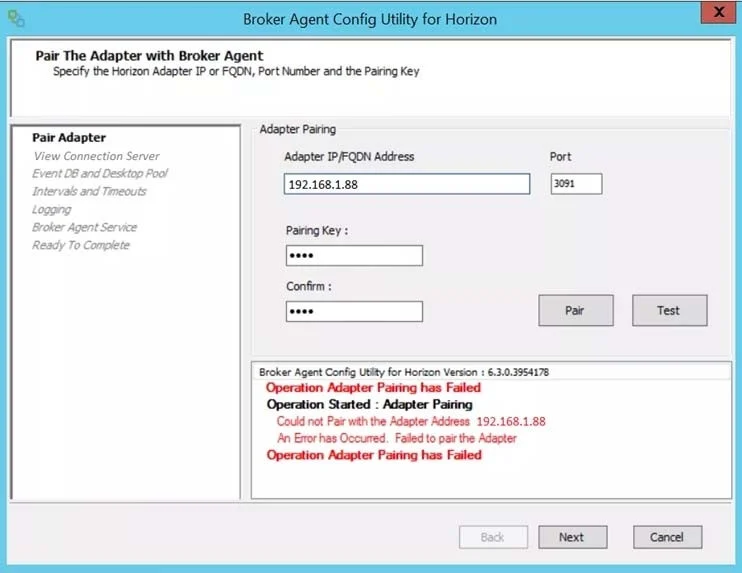
Options
- AConfigure the firewall to allow communications
- BStart the VMware vRealize Operations for Horizon Broker Agent service on the virtual desktops
- CVerify that the pairing key is correct
- DConfigure DNS to properly resolve the hostnames
How the community answered
(24 responses)- A79% (19)
- B13% (3)
- D8% (2)
Explanation
Explanation/Reference: The Horizon Broker Agent is installed on the Connection Server, not on desktops. And they are using an IP address for the adapter so DNS resolution will not prevent pairing (although it may cause issues further down the line).
Topics
Community Discussion
No community discussion yet for this question.