
Broadcom-VMware
2V0-51.19 · Question #14
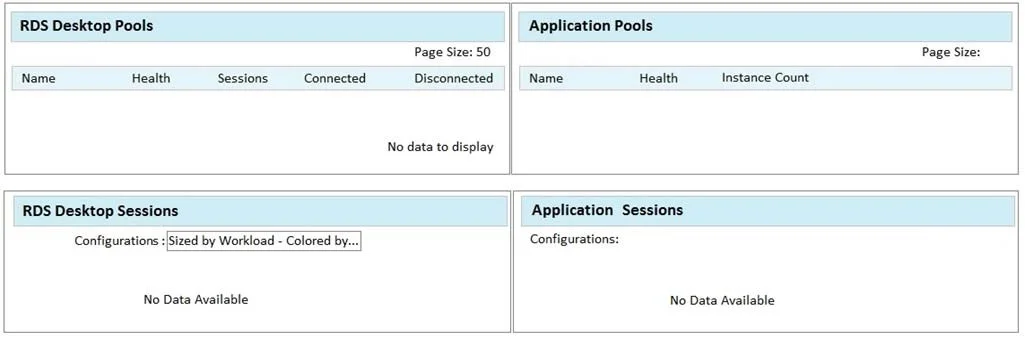
Refer to the exhibit. While using vRealize Operations for VMware Horizon you notice that the Horizon RDS Pools Dashboard displays the message in the exhibit. What should be done to resolve the issue?
The correct answer is A. Verify that the vRealize Operations for Horizon Desktops agent is installed on the RDSH servers. Explanation/Reference:
Section 5 – Horizon Troubleshooting and Operations
Question
Refer to the exhibit. While using vRealize Operations for VMware Horizon you notice that the Horizon RDS Pools Dashboard displays the message in the exhibit. What should be done to resolve the issue?
Exhibit
Options
- AVerify that the vRealize Operations for Horizon Desktops agent is installed on the RDSH servers
- BSet the RDS Pools Dashboard as the default dashboard
- CEnsure that RDS licensing has been configured for the RDS servers
- DConfigure the View Events database
How the community answered
(31 responses)- A71% (22)
- B16% (5)
- C10% (3)
- D3% (1)
Explanation
Explanation/Reference:
Topics
#vRealize Operations#RDS Pools Dashboard#Horizon Desktops agent#RDSH
Community Discussion
No community discussion yet for this question.