
2V0-21.23 · Question #110
Refer to the exhibit. An administrator is tasked with adding new capacity to an existing software- defined data center (SDDC). - The SDDC currently hosts two vSphere clusters (ClusterA and ClusterB)…
The correct answer is A. Disable the Enhanced vMotion Compatibility (EVC) on the VM. D. Power on the VM. E. Configure the Enhanced vMotion Compatibility (EVC) on vSphere Cluster A and B to sup-port Intel. To enable the 'evc1' VM to migrate to all clusters, the administrator must first configure a common EVC baseline across Clusters A and B, then disable the VM's individual EVC setting if it's causing incompatibility, and finally power on the VM for the CPU configuration changes…
Question
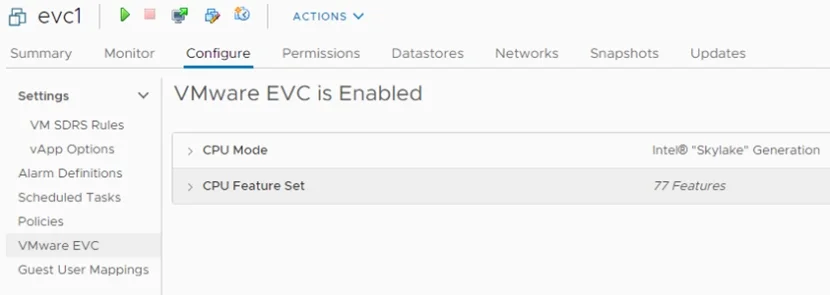
Refer to the exhibit. An administrator is tasked with adding new capacity to an existing software- defined data center (SDDC).
- The SDDC currently hosts two vSphere clusters (ClusterA and ClusterB) with different CPU
compatibilities.
- vSphere vMotion and vSphere Distributed Resource Scheduler (DRS) are currently in use in the
SDDC.
- The new capacity will be implemented by provisioning four ESXi hosts running a new generation
of Intel Skylake CPUs.
- All workload virtual machines (VMs) must support live migration to any cluster in the SDDC.
The administrator noticed the running critical "evc1" virtual machine (VM) shown in the exhibit is not migrating using vSphere vMotion to the original Clusters A or B. Which three steps must the administrator take to support this functionality? (Choose three.)
Exhibit
Options
- ADisable the Enhanced vMotion Compatibility (EVC) on the VM.
- BReboot the VM.
- CConfigure the Enhanced vMotion Compatibility (EVC) on the VM to Intel Skylake.
- DPower on the VM.
- EConfigure the Enhanced vMotion Compatibility (EVC) on vSphere Cluster A and B to sup-port Intel
- FPower off the VM.
How the community answered
(45 responses)- A60% (27)
- B7% (3)
- C13% (6)
- F20% (9)
Why each option
To enable the 'evc1' VM to migrate to all clusters, the administrator must first configure a common EVC baseline across Clusters A and B, then disable the VM's individual EVC setting if it's causing incompatibility, and finally power on the VM for the CPU configuration changes to be applied.
If the 'evc1' VM has its own Enhanced vMotion Compatibility (EVC) setting configured at a generation higher than the target Clusters A or B, disabling this VM-level EVC allows the VM to adopt the EVC baseline of the cluster it is powered on in, enabling broader migration.
While a reboot restarts the VM, a full power cycle (power off followed by power on) is typically required to apply fundamental CPU feature changes or EVC settings by resetting the virtual CPU mask.
Configuring the VM's EVC to Intel Skylake would raise its CPU compatibility requirements, further restricting its ability to migrate to older or less capable Clusters A or B, which is counter to the goal of enabling broad migration.
Any changes to a virtual machine's CPU compatibility or EVC configuration, such as disabling VM-level EVC, require the VM to be powered off and then powered back on for the new virtual CPU mask to take effect.
To support live migration of virtual machines across clusters with different physical CPU generations, including the new Intel Skylake hosts, all vSphere clusters (A, B, and the new hosts) must be configured with a consistent, lowest common denominator EVC baseline.
While powering off the VM would be a necessary intermediate step to apply EVC changes, it is not one of the final three steps to support the functionality, as the VM must be powered back on to be operational and migratable.
Concept tested: vSphere EVC configuration for cross-cluster migration
Source: https://docs.vmware.com/en/VMware-vSphere/8.0/vsphere-vcenter-installation/GUID-62E8A663-C0D2-48F8-9844-4861C80B7AEB.html
Topics
Community Discussion
No community discussion yet for this question.