
2V0-21.23 · Question #31
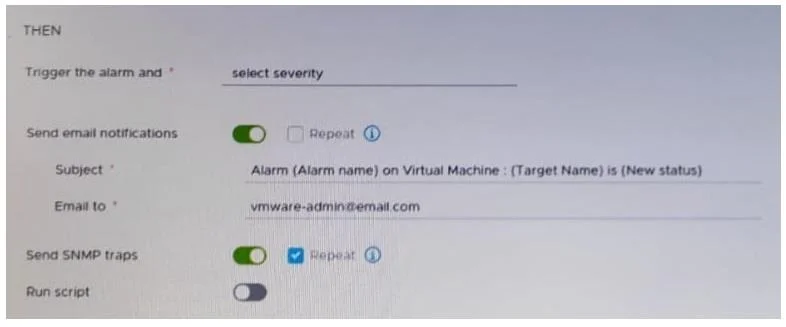
Refer to the exhibit. After updating a predefined alarm on VMware vCenter, an administrator enables email notifications as shown in the attached alarm; however, notifications are NOT being sent…
The correct answer is C. In the vCenter settings in the vSphere Client. To enable email notifications for vCenter alarms, the SMTP mail server settings must be configured globally within the vCenter Server itself. This configuration is accessible through the vSphere Client's vCenter settings.
Question
Refer to the exhibit. After updating a predefined alarm on VMware vCenter, an administrator enables email notifications as shown in the attached alarm; however, notifications are NOT being sent. Where must the mail server settings be configured by the administrator to resolve this issue?
Exhibit
Options
- AIn the ESXi host system config
- BIn the alarm rule definition
- CIn the vCenter settings in the vSphere Client
- DIn the vCenter Management Interface
How the community answered
(58 responses)- A9% (5)
- B3% (2)
- C72% (42)
- D16% (9)
Why each option
To enable email notifications for vCenter alarms, the SMTP mail server settings must be configured globally within the vCenter Server itself. This configuration is accessible through the vSphere Client's vCenter settings.
ESXi host system configuration does not control vCenter Server's global email notification settings for alarms.
The alarm rule definition only enables or disables email as an action for a specific alarm; it does not define the SMTP server parameters.
For vCenter Server to send email notifications for alarms, the global SMTP server settings (server address, port, authentication, sender email) must be configured directly within the vCenter Server's configuration accessible via the vSphere Client. Without these global settings, even if email notifications are enabled on an alarm, vCenter doesn't know where to send them.
The vCenter Management Interface (VAMI) is primarily for appliance-level configurations like networking and updates, not for application-level email notification settings for alarms.
Concept tested: vCenter Server alarm email configuration
Source: https://docs.vmware.com/en/VMware-vSphere/8.0/vsphere-vcenter-monitoring-performance/GUID-344D30AF-7A08-41E9-B864-754641666F6A.html
Topics
Community Discussion
No community discussion yet for this question.