
220-1102 · Question #479
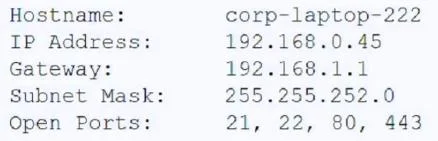
A technician is trying to connect to a user's laptop in order to securely install updates. Given the following information about the laptop: Which of the following should the technician do to…
The correct answer is D. Open port 3389 on the Windows firewall. To establish an RDP connection, the remote laptop's Windows Firewall must allow incoming traffic on the default RDP port (3389) for the connection to be successful.
Question
A technician is trying to connect to a user's laptop in order to securely install updates. Given the following information about the laptop:
Which of the following should the technician do to connect via RDP?
Exhibit
Options
- AConfirm the user can ping the default gateway.
- BChange the IP address on the user's laptop.
- CChange the subnet mask on the user's laptop.
- DOpen port 3389 on the Windows firewall.
How the community answered
(34 responses)- A9% (3)
- B3% (1)
- C3% (1)
- D85% (29)
Why each option
To establish an RDP connection, the remote laptop's Windows Firewall must allow incoming traffic on the default RDP port (3389) for the connection to be successful.
Confirming the user can ping the default gateway tests basic network connectivity, but it doesn't ensure that RDP is enabled or that the firewall is configured to allow RDP connections.
Changing the IP address on the user's laptop would disrupt its network connectivity and is not a step required for enabling RDP access.
Changing the subnet mask on the user's laptop would likely disrupt its network connectivity and is not related to enabling RDP access.
Remote Desktop Protocol (RDP) typically uses TCP port 3389. For a technician to connect to a user's laptop via RDP, the Windows Firewall on the laptop must be configured to allow inbound connections on port 3389, otherwise, the connection will be blocked.
Concept tested: RDP firewall configuration
Source: https://learn.microsoft.com/en-us/windows-server/remote/remote-desktop-services/clients/remote-desktop-allow-access
Topics
Community Discussion
No community discussion yet for this question.