
210-065 · Question #24
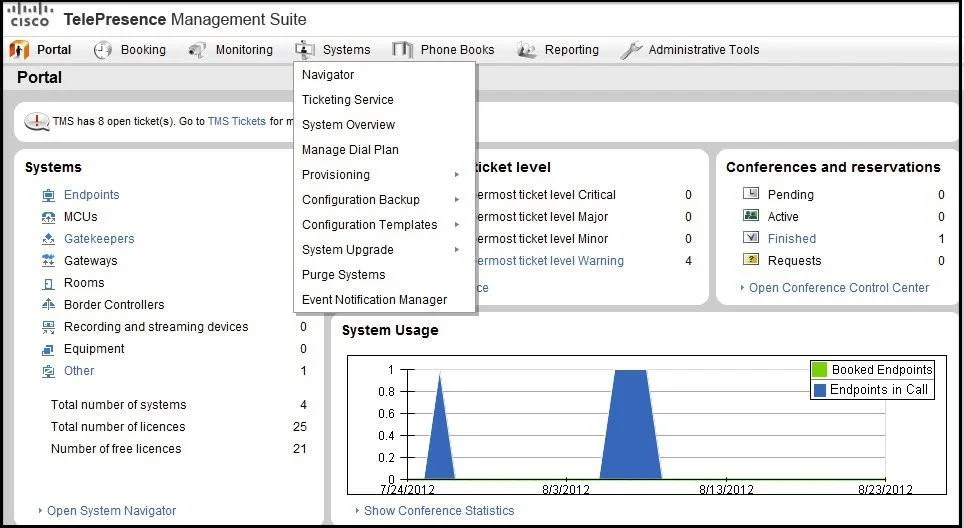
Refer to the exhibit. Which system tab can be used to add video infrastructure devices and endpoints?
The correct answer is A. Navigator. In Cisco TMS, the Navigator tab is the correct location for browsing the system hierarchy and adding new video infrastructure devices and endpoints.
Question
Refer to the exhibit. Which system tab can be used to add video infrastructure devices and endpoints?
Exhibit
Options
- ANavigator
- BSystem Overview
- CConfiguration Templates
- DProvisioning
- EAdministrative Tools
How the community answered
(21 responses)- A90% (19)
- B5% (1)
- D5% (1)
Why each option
In Cisco TMS, the Navigator tab is the correct location for browsing the system hierarchy and adding new video infrastructure devices and endpoints.
The Navigator tab in Cisco TMS provides a hierarchical folder-based view of the entire TMS infrastructure and is the primary interface where administrators add new video endpoints and infrastructure devices such as MCUs, gatekeepers, and gateways. It functions as the main system browser and device registration entry point within the TMS web interface.
System Overview displays a dashboard-style status summary of the TMS environment but does not provide the ability to add new devices or endpoints.
Configuration Templates are used to apply predefined configuration settings to already-registered endpoints, not to add new devices to the TMS system.
The Provisioning tab manages provisioning profiles and configurations for endpoints but is not the interface used to manually add video infrastructure devices.
Administrative Tools contains system-level settings such as user management and diagnostics and does not include the functionality for adding video endpoints or infrastructure.
Concept tested: Cisco TMS Navigator tab device management
Source: https://www.cisco.com/c/en/us/td/docs/telepresence/tms/admin/guide/tms_admin.html
Topics
Community Discussion
No community discussion yet for this question.