
210-065 · Question #143
A customer wants to purchase a video endpoint that supports a touchscreen control. The engineer recommends a Cisco TelePresence MX300G2 endpoint. Which information about this endpoint should the…
The correct answer is D. The endpoint comes with the 10-inch touchscreen by default. The MX endpoints are easy-to-deploy multipurpose room solutions that include all the components needed for use. The MX endpoints originated with the MX200 and MX300. These are all-in-one monitor/endpoint combinations that require only an Ethernet and power cable to operate…
Question
A customer wants to purchase a video endpoint that supports a touchscreen control. The engineer recommends a Cisco TelePresence MX300G2 endpoint. Which information about this endpoint should the engineer tell the customer?
Exhibit
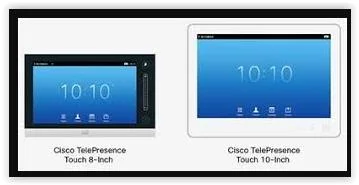
Options
- AThe endpoint comes with the 8-inch touchscreen by default.
- BThe endpoint comes with the 8-inch touchscreen by default.
- CYou can purchase the endpoint with either the 8-inch touchscreen or the 10-inch touchscreen.
- DThe endpoint comes with the 10-inch touchscreen by default.
How the community answered
(23 responses)- A9% (2)
- B4% (1)
- D87% (20)
Explanation
The MX endpoints are easy-to-deploy multipurpose room solutions that include all the components needed for use. The MX endpoints originated with the MX200 and MX300. These are all-in-one monitor/endpoint combinations that require only an Ethernet and power cable to operate. They come with a TRC5 remote control and can be integrated with the Touch 8 controller. However, these two endpoints do not support the multisite option. Cisco wanted to redesign these products and extend their functionality, so they came out with the MX200G2 and MX300G2 (G2 is for Generation 2). Though the screen size is the same, these two newer generation endpoints have a cleaner look, support the multisite option key, and come standard with a Touch 10 controller. The next MX endpoints are the MX700 and MX800. A secondary monitor can be added to these endpoints. Like the MX200G2 and MX300G2, the MX700 and MX800 come with a Touch 10 Any endpoint that comes with the TRC5 remote can be integrated with a Touch 8 control panel. If the control panel is used on any system, the remote control is disabled. Also, the MX200G2, MX300G2, MX700, and the MX800 come with a Touch 10 controller. All Cisco Touch control pads do require a physical connection to the endpoints they are controlling. For endpoints that have a dual network interface card (NIC) port available, the Touch can be plugged into that available port. If the distance from the Touch to the endpoint is greater than 7.5 meters (about 25 feet), it can be connected to a Power over Ethernet (PoE) switch port or through a power injector. This extends the reach of the Touch an additional 5 meters (16 feet).
Topics
Community Discussion
No community discussion yet for this question.