
210-065 · Question #128
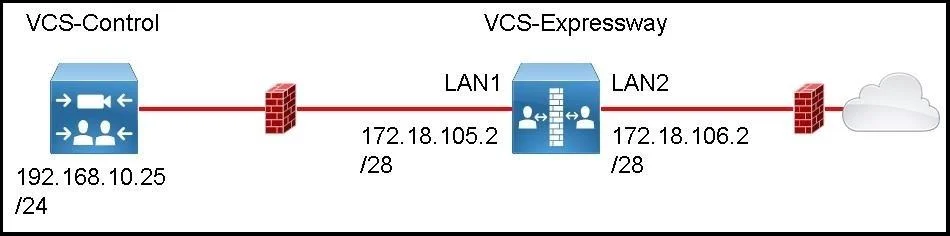
Refer to the exhibit. You are deploying a Cisco VCS Expressway with the Advanced Networking option key into two separate DMZs. Gateways for all networks are the lowest usable IP address in the…
The correct answer is D. xCommand RouteAdd Address:192.168.10.25 PrefixLength:32 Gateway: 172.18.105.1 Interface. To add a static route to only the specific VCS Control host IP on a Cisco VCS Expressway, the xCommand RouteAdd command with a /32 prefix length targeting the exact host address is required.
Question
Refer to the exhibit. You are deploying a Cisco VCS Expressway with the Advanced Networking option key into two separate DMZs. Gateways for all networks are the lowest usable IP address in the subnet. While you are logged in as an admin user, which command should you enter into the CLI, to enable IP routing to the Cisco VCS Control and nothing else on the internal network?
Exhibit
Options
- AxConfiguration IP Gateway: 172.18.105.1
- BxConfiguration RouteAdd Address:192.168.10.25 PrefixLength:16 Gateway: 172.18.105.1
- CxCommand RouteAdd Address:192.168.0.0 PrefixLength:16 Gateway: 172.18.105.1 Interface:
- DxCommand RouteAdd Address:192.168.10.25 PrefixLength:32 Gateway: 172.18.105.1 Interface:
How the community answered
(27 responses)- A19% (5)
- B4% (1)
- C11% (3)
- D67% (18)
Why each option
To add a static route to only the specific VCS Control host IP on a Cisco VCS Expressway, the xCommand RouteAdd command with a /32 prefix length targeting the exact host address is required.
xConfiguration IP Gateway sets the system default gateway, which would affect routing for all destinations rather than only the VCS Control host.
xConfiguration RouteAdd is not valid VCS CLI syntax - static routes must be added using xCommand RouteAdd, making this command structurally incorrect.
Using Address:192.168.0.0 with PrefixLength:16 creates a route to the entire 192.168.0.0/16 subnet, not just the specific VCS Control host, violating the 'nothing else on the internal network' constraint.
The xCommand RouteAdd is the correct CLI command type for adding static routes on Cisco VCS. Specifying Address:192.168.10.25 with PrefixLength:32 creates a host-specific route that targets only the VCS Control IP, satisfying the requirement to reach nothing else on the internal network. The gateway 172.18.105.1 is the lowest usable address in the subnet, consistent with the described network convention.
Concept tested: Cisco VCS Expressway CLI host route configuration with xCommand
Topics
Community Discussion
No community discussion yet for this question.