
201 · Question #113
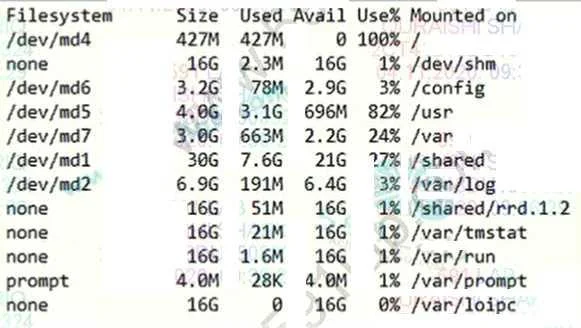
Refer to the exhibit. The BIG-IP Administrator is investigating disk utilization on the BIG-IP device. What should the BIG-IP Administrator check next?
The correct answer is A. Large files on the / file system. When investigating disk utilization, especially if the '/' (root) filesystem is showing high usage, the administrator should check for large files within that filesystem. This helps identify unnecessary or growing files consuming space, as the root filesystem is critical for…
Question
Refer to the exhibit. The BIG-IP Administrator is investigating disk utilization on the BIG-IP device. What should the BIG-IP Administrator check next?
Exhibit
Options
- ALarge files on the / file system
- BResults from the EUD test
- CResults from the platform diagnostics test
- DLarge files on /usr file system
How the community answered
(45 responses)- A71% (32)
- B4% (2)
- C9% (4)
- D16% (7)
Why each option
When investigating disk utilization, especially if the '/' (root) filesystem is showing high usage, the administrator should check for large files within that filesystem. This helps identify unnecessary or growing files consuming space, as the root filesystem is critical for system operation.
The '/' (root) file system is critical and contains many system directories. If disk utilization is high, checking for large files within this filesystem (e.g., core dumps, old log files, temporary files) is a primary troubleshooting step to identify what is consuming space and potentially causing performance issues.
Results from the EUD (End User Diagnostics) test are related to hardware health and functionality, not directly to disk space utilization.
Results from the platform diagnostics test are also focused on hardware and system health, not specifically on identifying disk space consumption by files.
While '/usr' is a significant filesystem, the root filesystem itself can still fill up with critical files, and investigating '/' directly is a broader and often more relevant initial step.
Concept tested: F5 BIG-IP disk utilization troubleshooting
Source: https://my.f5.com/manage/s/article/K14403
Topics
Community Discussion
No community discussion yet for this question.