
200-901 · Question #664
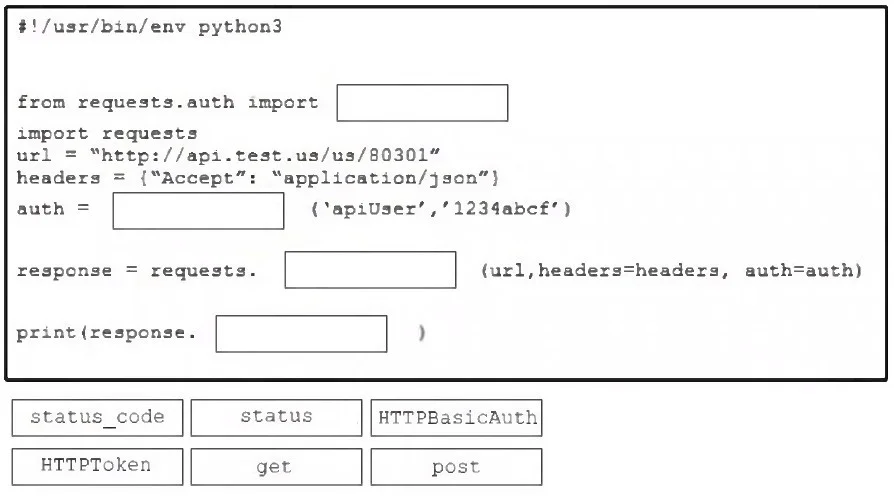
Drag and Drop Question Drag and drop the code from the bottom onto the box where the code is missing to output the status of the REST API response from the script. Some options may be used more than…
The correct answer is HTTPBasicAuth; HTTPBasicAuth; get; status_code. This question assesses the test-taker's proficiency in using Python's requests library to perform a basic authenticated GET request to a REST API and retrieve its HTTP status code.
Question
Exhibit
Answer Area
Drag items
Correct arrangement
- HTTPBasicAuth
- HTTPBasicAuth
- get
- status_code
Explanation
This question assesses the test-taker's proficiency in using Python's requests library to perform a basic authenticated GET request to a REST API and retrieve its HTTP status code.
Approach. The correct interaction involves dragging and dropping the following code snippets into their respective blanks:
from requests.auth import HTTPBasicAuth: The lineauth = _____ ('apiUser', '1234abcf')indicates that an authentication class is being instantiated with a username and password.HTTPBasicAuthis the correct class for standard HTTP Basic Authentication from therequests.authmodule.auth = HTTPBasicAuth ('apiUser', '1234abcf'): Following the import, theHTTPBasicAuthclass is instantiated with the provided username and password to create an authentication object.response = requests.get (url, headers=headers, auth=auth): The scenario describes an API call to a URL with headers and authentication. Without any explicit instruction to send a body or create/update resources, a standard request to retrieve information from an API is typically aGETrequest. Therequests.get()method is used for this purpose.print(response.status_code): The question asks to 'output the status of the REST API response'. Thestatus_codeattribute of therequestslibrary'sResponseobject provides the integer HTTP status code (e.g., 200, 404, 500), which is the most accurate way to report the response status.
Common mistakes.
- common_mistake. Common mistakes include:
- Using
HTTPTokeninstead ofHTTPBasicAuth:HTTPTokenis used for token-based authentication (like Bearer tokens) and not for simple username/password pairs as shown in the example. - Using
postinstead ofget: APOSTrequest is generally used to send data to the server to create or update a resource. Since there's no data payload or specific intent to modify resources mentioned,GETis the appropriate method for fetching information. - Using
statusinstead ofstatus_code: TherequestslibraryResponseobject does not expose astatusattribute to get the HTTP status code directly. Instead,response.status_codereturns the numerical status (e.g., 200, 404), andresponse.reasonreturns the textual reason (e.g., 'OK', 'Not Found').status_codeis the precise attribute needed here.
Concept tested. The core concept tested is the ability to write Python code using the requests library to interact with REST APIs, specifically focusing on HTTP Basic Authentication, making GET requests, and retrieving the HTTP status code from the response object.
Topics
Community Discussion
No community discussion yet for this question.