
200-901 · Question #430
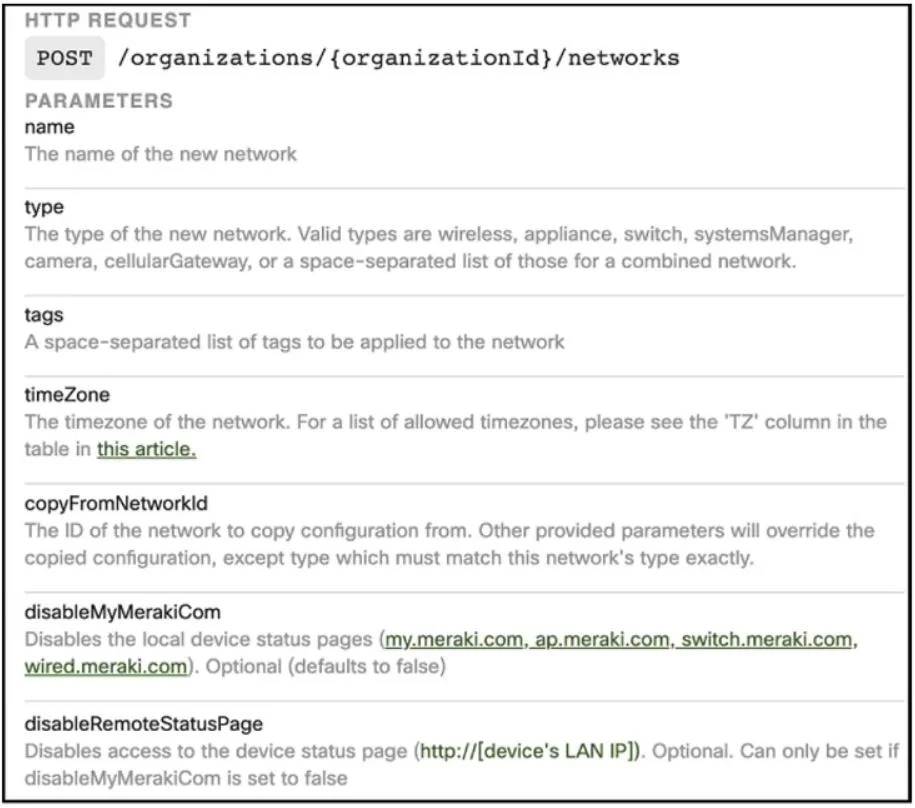
Drag and Drop Question Refer to the exhibit. Drag and drop the code from the bottom onto the box where the code is missing on the Meraki Python script to create a new network. Answer:
The correct answer is organizations; org_id; api_key; name. This question tests the ability to interpret API documentation and correctly construct a Python script to interact with a RESTful API, specifically the Cisco Meraki API for creating a new network.
Question
Drag and Drop Question Refer to the exhibit. Drag and drop the code from the bottom onto the box where the code is missing on the Meraki Python script to create a new network. Answer:
Exhibit
Answer Area
Drag items
Correct arrangement
- organizations
- org_id
- api_key
- name
Explanation
This question tests the ability to interpret API documentation and correctly construct a Python script to interact with a RESTful API, specifically the Cisco Meraki API for creating a new network.
Approach. To correctly fill the blanks, one must cross-reference the Python script with the API documentation provided in the first image, and general knowledge of the Python 'requests' library and REST API structure.
- Blank 1 (URL path after 'base_url + "/"): The API documentation states the endpoint is '/organizations/{organizationId}/networks'. Therefore, 'organizations' is the first segment of the path, to be placed after the base URL.
- Blank 2 (URL path after 'organizations/' and before '/networks'): This corresponds to '{organizationId}' in the documentation. In the script, 'org_id' is defined as the variable holding this value. So, 'org_id' is placed here.
- Blank 3 (Argument to 'requests.post()' before '= {curly brace}'): The dictionary following this blank contains 'X-Cisco-Meraki-API-Key' and 'Content-Type'. These are standard HTTP request headers. In the 'requests' library, these are passed via the 'headers' parameter. Thus, 'headers' is the correct choice.
- Blank 4 (Value for 'X-Cisco-Meraki-API-Key'): The script defines 'api_key' as the variable holding the API authentication key. This variable should be used here as the value for the Meraki API key header.
- Blank 5 (Key in the 'data' payload for 'network_name'): The API documentation for creating a network clearly lists 'name' as a required parameter for the new network. In the script, 'network_name' is the variable holding the desired name. Therefore, 'name' is the key in the JSON payload.
Common mistakes.
- common_mistake. Common mistakes include confusing the 'org_id' variable with 'api_key' for the URL path or header value. Incorrectly placing 'network_name' as the JSON key instead of 'name' (as specified in the API documentation for the parameter) is another frequent error. Failing to identify 'headers' as the parameter for the dictionary containing authentication and content type information demonstrates a lack of familiarity with common HTTP request structures or the 'requests' library. Misinterpreting the URL structure from the API documentation, for instance, placing 'api_key' in the URL path, would also be incorrect.
Concept tested. RESTful API interaction, HTTP methods (POST), URL structure, request parameters, request headers (authentication, content-type), JSON payload construction, and basic Python scripting with the 'requests' library.
Topics
Community Discussion
No community discussion yet for this question.