
200-901 · Question #409
Drag and Drop Question Drag and drop the code from the bottom onto the box where the code is missing to construct a Python script that calls a REST API request. The Python script retrieves a list of…
The correct answer is requests; response; status_code; item. This question tests the ability to construct a Python script using the 'requests' library to make a GET request to a REST API, handle HTTP status codes, and parse JSON responses.
Question
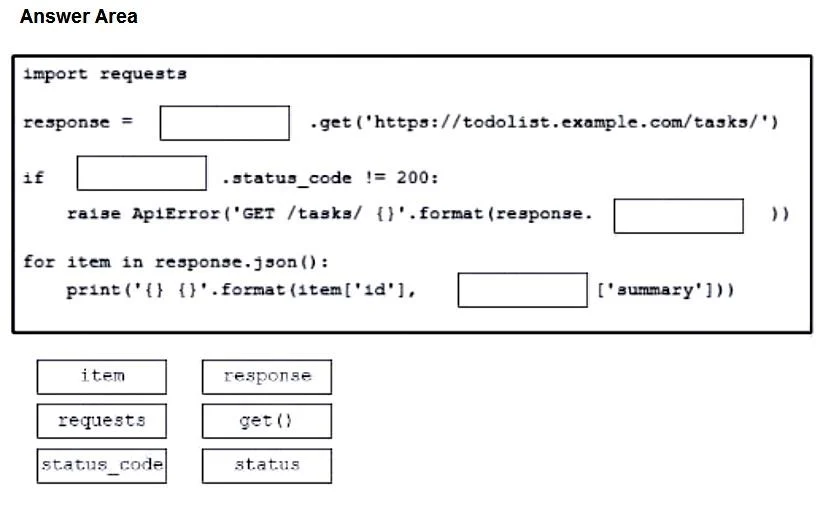
Drag and Drop Question Drag and drop the code from the bottom onto the box where the code is missing to construct a Python script that calls a REST API request. The Python script retrieves a list of tasks from a to- do list for effective project management purposes. Not all options are used. Answer:
Exhibit
Answer Area
Drag items
Correct arrangement
- requests
- response
- status_code
- item
Explanation
This question tests the ability to construct a Python script using the 'requests' library to make a GET request to a REST API, handle HTTP status codes, and parse JSON responses.
Approach. 1. The first blank, 'response = ____ .get(...), requires the library object to call the '.get()' method. The 'requests' library is imported, so 'requests' is the correct snippet to drag here. This forms 'response = requests.get(...)'. 2. The second blank, 'if ____ .status_code != 200:', checks the status code of the HTTP response. The 'response' object, which stores the result of the API call, contains the 'status_code' attribute. Therefore, 'response' should be dragged here to form 'if response.status_code != 200:'. 3. The third blank, 'raise ApiError(...).format(response. ____ ))', is part of error handling and formats an error message using the response's status. The 'status_code' attribute of the 'response' object holds this information. So, 'status_code' should be dragged here to form 'response.status_code'. 4. The fourth blank, 'print('{} {}').format(item['id'], ____ ['summary']))', is within a loop iterating through 'item' objects from the JSON response. To access the 'summary' key, it must be part of the current 'item' dictionary. Thus, 'item' should be dragged here to form 'item['summary']'.
Common mistakes.
- common_mistake. 1. Dragging 'get()' to the first blank ('response = ____ .get(...)') is incorrect because 'get()' is a method, not an object to call a method on. The 'requests' object itself calls the 'get()' method.
- Using 'status' instead of 'status_code' for the response's status is incorrect. The 'requests' library uses 'status_code' (an integer) to represent the HTTP status, not 'status' (which is not a standard attribute for this purpose).
- Misplacing 'response' or 'item' in other blanks would lead to syntax errors or incorrect object access, as they refer to specific objects ('response' for the HTTP response, 'item' for an element in the JSON array).
Concept tested. Python 'requests' library usage for making HTTP GET requests, handling HTTP response status codes (e.g., 200 OK), parsing JSON data from an API response, iterating through JSON arrays, and basic string formatting in Python.
Topics
Community Discussion
No community discussion yet for this question.