
200-901 · Question #372
Refer to the exhibit. A network engineer must copy the "config.txt" file from directory TEST to directory PROD. The copied file must also be renamed into "current.txt". Which command must be used to…
The correct answer is D. cp ./TEST/config.txt ./PROD/current.txt. The Linux cp command requires the source file as the first argument and the destination path (including the new filename) as the second argument.
Question
Refer to the exhibit. A network engineer must copy the "config.txt" file from directory TEST to directory PROD. The copied file must also be renamed into "current.txt". Which command must be used to accomplish these tasks?
Exhibit
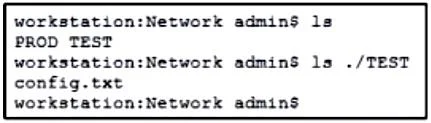
Options
- Acp ./PROD/current.txt ./TEST/config.txt
- Bcp ./TESTi/current.txt ./PROD/config.txt
- Ccp ./PROD/config.txt ./TEST/current.txt
- Dcp ./TEST/config.txt ./PROD/current.txt
How the community answered
(52 responses)- A4% (2)
- B8% (4)
- C2% (1)
- D87% (45)
Why each option
The Linux cp command requires the source file as the first argument and the destination path (including the new filename) as the second argument.
The source and destination are reversed, so this command would copy from PROD/current.txt to TEST/config.txt - the opposite of the required direction.
This command references a nonexistent path './TESTi/current.txt' due to a typo, and places the destination as PROD/config.txt, which copies from the wrong source and does not rename the file correctly.
The source and destination are reversed, copying from PROD/config.txt to TEST/current.txt, which moves the file in the wrong direction and to the wrong directory.
The command cp ./TEST/config.txt ./PROD/current.txt correctly places the source file (config.txt in TEST) first and the destination with the renamed target (current.txt in PROD) second, accomplishing both the copy and rename in a single cp operation.
Concept tested: Linux cp command for file copy and rename
Source: https://linux.die.net/man/1/cp
Topics
Community Discussion
No community discussion yet for this question.