
200-901 · Question #358
Refer to the exhibit. The YAML shown contains an object "param0" that is equal to "Workflow1", a second object "param1" that contains an object called "list" which contains an array of two objects…
The correct answer is D. [ "param0":"Workflow1", "param1": { "list": [ { "name":"VLAN_ID" }, { "value":"198" } ] }, "param2":0 ]. The YAML exhibit translates into a JSON data structure containing a list of objects, correctly preserving the data types of string values for Workflow1 and 198, and an integer for 0.
Question
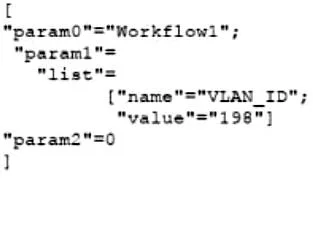
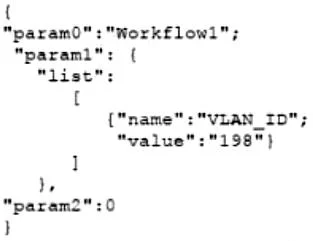
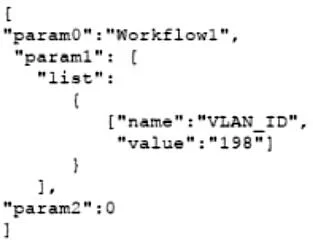
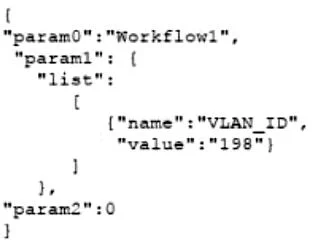
Refer to the exhibit. The YAML shown contains an object "param0" that is equal to "Workflow1", a second object "param1" that contains an object called "list" which contains an array of two objects, "name" (equal to "VLAN_ID") and "value" (equal to a text value "198"), and finally a third object "param2" that is equal to "0". What is the equivalent message in JSON data format? A. B. C. D.
Exhibits
Options
- A[ {"param0":"Workflow1"}, {"param1": { "list": [ {"name":"VLAN_ID"}, {"value":"198"} ] }}, {"param2":"0"} ]
- B[ "param0":"Workflow1", "param1": { "list": [ { "name":"VLAN_ID", "value":"198" } ] }, "param2":0 ]
- C[ "param0":"Workflow1", "param1": { "list": [ { "name":"VLAN_ID" }, { "value":"198" } ] }, "param2":0 ]
- D[ "param0":"Workflow1", "param1": { "list": [ { "name":"VLAN_ID" }, { "value":"198" } ] }, "param2":0 ]
How the community answered
(38 responses)- A16% (6)
- B3% (1)
- C5% (2)
- D76% (29)
Why each option
The YAML exhibit translates into a JSON data structure containing a list of objects, correctly preserving the data types of string values for `Workflow1` and `198`, and an integer for `0`.
This option incorrectly translates `param2: 0` from an integer in YAML to a string `"0"` in JSON.
This option incorrectly translates `param2: 0` from an integer in YAML to a string `"0"` in JSON, and it incorrectly structures the `list` as a single object with both `name` and `value` keys combined.
This option incorrectly translates `param2: 0` from an integer in YAML to a string `"0"` in JSON.
Option D accurately translates the data types from the YAML into JSON, specifically recognizing that `param2: 0` in YAML represents an integer `0` in JSON, and `value: '198'` represents a string `"198"`. The nested structure of `param1` with its `list` array containing objects for `name` and `value` is also correctly represented.
Concept tested: YAML to JSON conversion, data type mapping
Source: null
Topics
Community Discussion
No community discussion yet for this question.