
200-901 · Question #304
Drag and Drop Question Refer to the exhibit. Drag and drop the code from the bottom onto the box where the code is missing to complete the function that adds a new global access rule that denies…
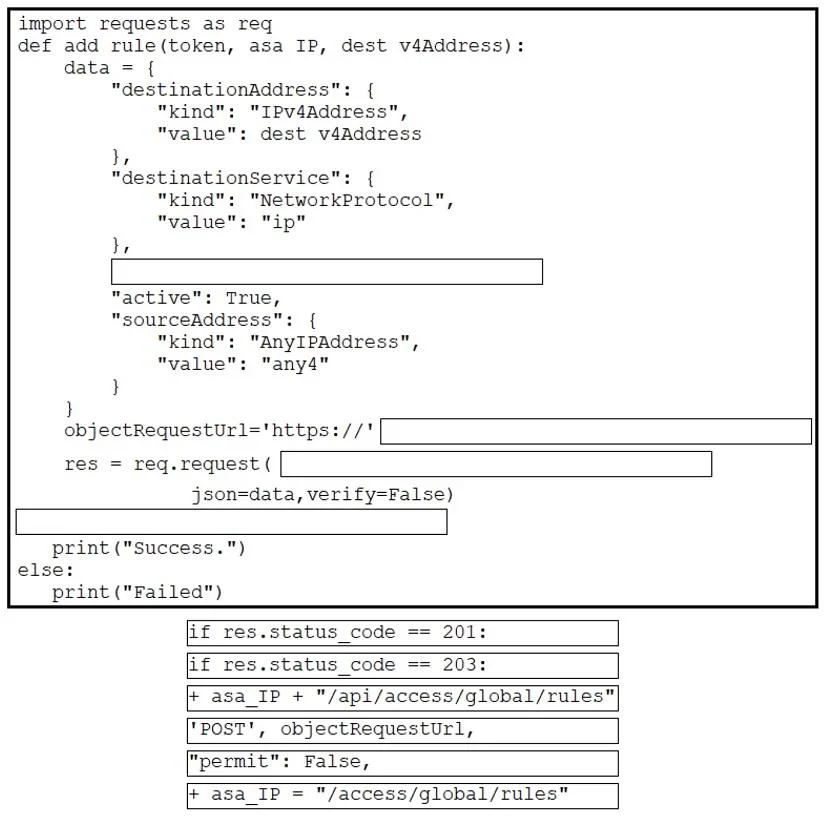
The correct answer is "permit": False,; + asa_IP + "/api/access/global/rules"; 'POST', objectRequestUrl. This question tests the ability to construct a Python script to interact with a REST API based on provided documentation, specifically to add a global access rule that denies traffic.
Question
Drag and Drop Question Refer to the exhibit. Drag and drop the code from the bottom onto the box where the code is missing to complete the function that adds a new global access rule that denies traffic using the Cisco ASA REST API. Not all options are used. Answer:
Exhibits
Answer Area
Drag items
Correct arrangement
- "permit": False,
- asa_IP + "/api/access/global/rules"
- 'POST', objectRequestUrl,
Explanation
This question tests the ability to construct a Python script to interact with a REST API based on provided documentation, specifically to add a global access rule that denies traffic.
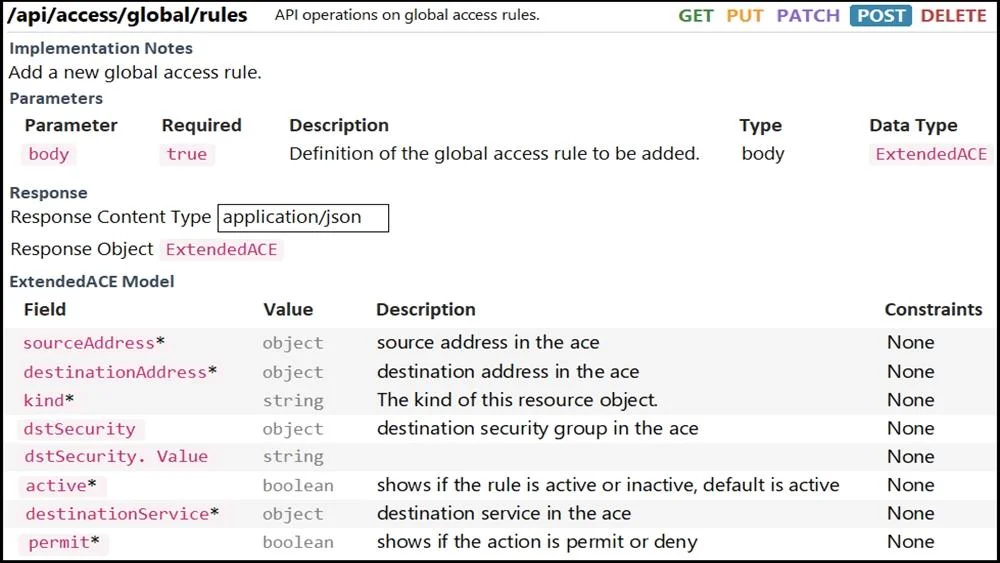
Approach. Based on the problem statement to 'add a new global access rule that denies traffic' and the API documentation, the correct interactions are:
-
Drag '"permit": False,' into the blank within the
datadictionary. The API documentation for theExtendedACEmodel shows thepermitfield is a boolean that 'shows if the action is permit or deny.' To deny traffic, this value must beFalse. -
Drag '+ asa_IP + "/api/access/global/rules"' into the blank for
objectRequestUrlassignment. The API documentation specifies the endpoint as/api/access/global/rules. Theasa_IPvariable likely holds the base URL for the ASA device, so concatenating them forms the complete URL. -
Drag ''POST', objectRequestUrl,' into the blank for
res = req.request(...). The problem states 'add a new global access rule,' which corresponds to aPOSToperation according to the API documentation ('POST' is listed as a method for the endpoint, and 'Implementation Notes' say 'Add a new global access rule.'). Therequestslibrary'srequestmethod takes the HTTP method as the first argument and the URL as the second. -
Drag 'if res.status_code == 201:' into the blank for the conditional check. When a new resource is successfully created via a
POSTrequest, the standard HTTP status code for 'Created' is 201. This is the expected successful response for adding a new rule.
Common mistakes.
- common_mistake. Common mistakes include:
- Using '"permit": True,' (if available) or omitting the 'permit' field: This would result in a rule that permits traffic instead of denying it, contradicting the problem statement.
- Using 'if res.status_code == 203:': HTTP status code 203 (Non-Authoritative Information) is not a standard success code for resource creation. It indicates that the information in the entity header is from a cached copy rather than the original source, which is incorrect for a successful POST operation.
- Using '+ asa_IP = "/access/global/rules"': This option is syntactically incorrect for URL construction within the
objectRequestUrlassignment and would result in a Python error. TheobjectRequestUrlvariable needs to be assigned the full URL string, not have a segment of the URL assigned toasa_IP. - Incorrect order or arguments for
req.request: Misplacing the HTTP method or URL, or trying to pass the data directly withoutjson=data, would lead to an incorrect or failed API call.
Concept tested. The core concepts tested are: Understanding and interpreting RESTful API documentation (Swagger/OpenAPI-like specifications), knowing common HTTP methods (especially POST for resource creation) and status codes (201 for Created), constructing HTTP requests in Python using the requests library, and forming JSON request bodies based on API models.
Topics
Community Discussion
No community discussion yet for this question.