
200-901 · Question #296
Refer to the exhibit. A collaboration engineer has developed a script to automate the gathering of information by providing the email address of the individual. When the engineer tests the script, a…
The correct answer is A. Add "Authorization": "Bearer <WEBEX_TOKEN>" to the headers. A 401 Unauthorized HTTP error means the request lacks valid authentication credentials. The Cisco Webex REST API uses Bearer token authentication via the HTTP Authorization header. The correct fix is to include 'Authorization': 'Bearer <WEBEX_TOKEN>' in the request headers…
Question
Refer to the exhibit. A collaboration engineer has developed a script to automate the gathering of information by providing the email address of the individual. When the engineer tests the script, a 401 error is received. Which command fixes the script?
Exhibit
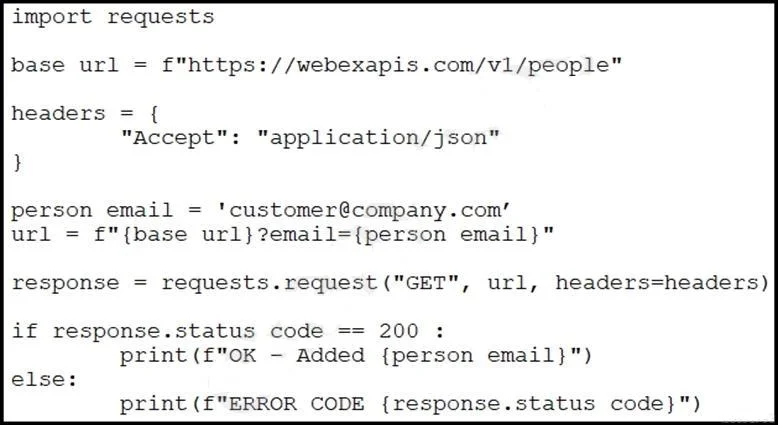
Options
- AAdd "Authorization": "Bearer <WEBEX_TOKEN>" to the headers.
- BAdd "Authentication": "Basic <WEBEX_TOKEN>" in the base_url after "https://".
- CAdd "<Authorization>:<password>@" in the base_url after "https://".
- DAdd "Authentication": "Bearer <WEBEX_TOKEN>" to the headers.
How the community answered
(43 responses)- A81% (35)
- B2% (1)
- C12% (5)
- D5% (2)
Explanation
A 401 Unauthorized HTTP error means the request lacks valid authentication credentials. The Cisco Webex REST API uses Bearer token authentication via the HTTP Authorization header. The correct fix is to include 'Authorization': 'Bearer <WEBEX_TOKEN>' in the request headers. Choice B uses the wrong header name ('Authentication' instead of 'Authorization') and wrong placement. Choice C embeds credentials in the URL, which is insecure and incorrect for Webex. Choice D also uses the wrong header name ('Authentication' instead of 'Authorization'); the correct header name is 'Authorization'.
Topics
Community Discussion
No community discussion yet for this question.