
200-901 · Question #289
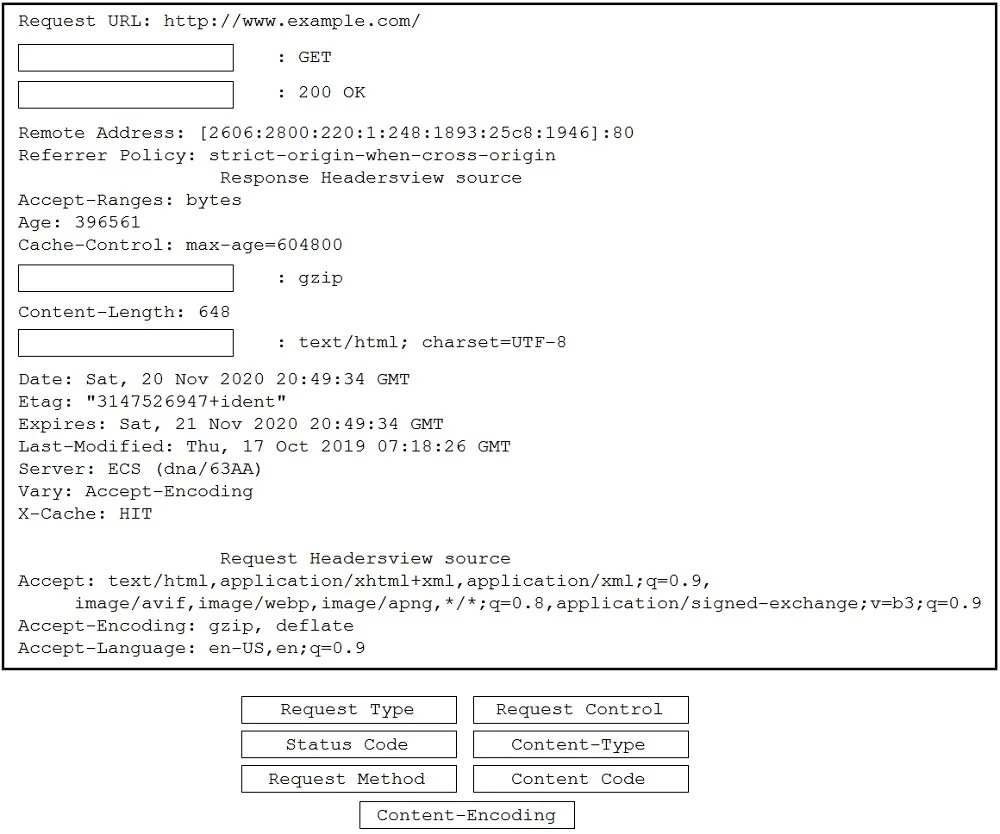
Drag and Drop Questions Drag and drop the code snippets from the bottom to the blanks in the code to complete the HTTP response. Not all options are used. Answer:
The correct answer is HTTPTokenAuth. This drag-and-drop question tests knowledge of common HTTP request and response header fields by requiring the test-taker to correctly label specific lines in an HTTP message transcript.
Question
Exhibit
Answer Area
Drag items
Correct arrangement
- HTTPTokenAuth
Explanation
This drag-and-drop question tests knowledge of common HTTP request and response header fields by requiring the test-taker to correctly label specific lines in an HTTP message transcript.
Approach. Based on the provided solution in the second exhibit image, the correct interaction is as follows:
- Drag 'Request Method' to the first blank, next to
: GET. The 'GET' method is a standard HTTP request method. - Drag 'Status Code' to the second blank, next to
: 200 OK. '200 OK' is a standard HTTP status code indicating success. - Drag 'Content-Type' to the third blank, next to
: gzip. While technically 'gzip' typically indicates 'Content-Encoding', the provided solution in the exhibit image explicitly places 'Content-Type' here. - Drag 'Content-Encoding' to the fourth blank, next to
: text/html; charset=UTF-8. While technically 'text/html; charset=UTF-8' typically indicates 'Content-Type', the provided solution in the exhibit image explicitly places 'Content-Encoding' here.
Common mistakes.
- common_mistake. Common mistakes include misidentifying the purpose of each HTTP line item. For example:
- Incorrectly placing 'Request Type' or 'Request Control' or 'Content Code' as these options do not directly correspond to the standard HTTP header names required in these specific contexts.
- Confusing 'Request Method' (like GET) with 'Status Code' (like 200 OK).
- A significant common mistake, based on standard HTTP knowledge, would be to swap the placement of 'Content-Type' and 'Content-Encoding' from what is shown in the exhibit's solution. Standard HTTP dictates that 'Content-Encoding: gzip' specifies the compression algorithm used, and 'Content-Type: text/html; charset=UTF-8' specifies the media type of the resource. However, for this specific question, the provided solution image shows the opposite mapping, making the technically correct placement a 'wrong' answer in the context of this particular exam question.
Concept tested. Understanding of fundamental HTTP protocol elements, including request methods, response status codes, and common HTTP response header fields such as Content-Type and Content-Encoding, and their typical values.
Topics
Community Discussion
No community discussion yet for this question.