
200-901 · Question #286
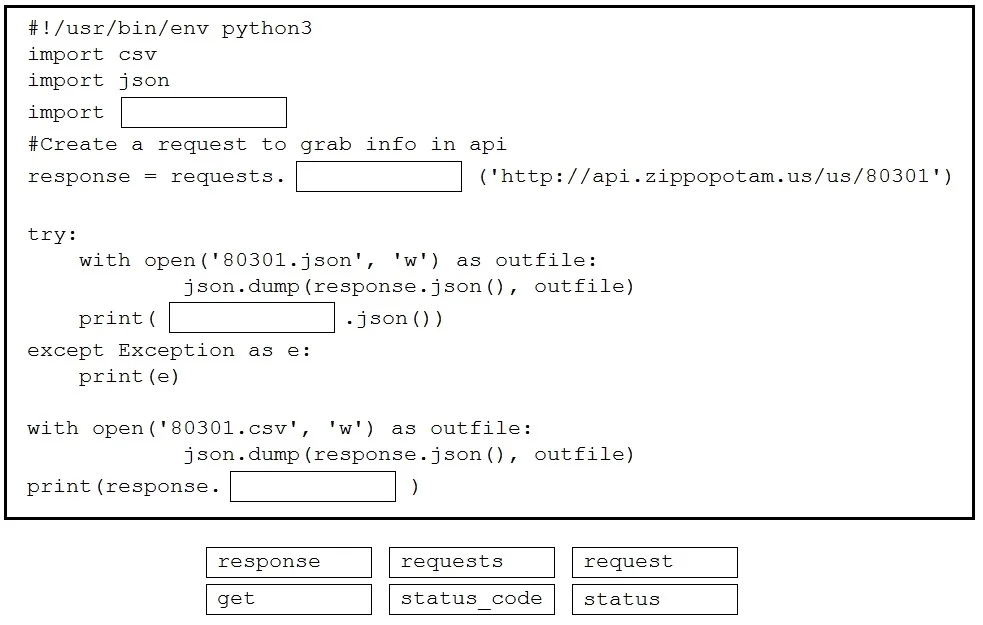
Drag and Drop Questions Drag and drop the code snippets from the bottom into the Python script to write API output to a csv file. Not all options are used. Answer:
The correct answer is requests; get; response; status_code. This question tests the ability to use the Python requests library for making API calls and processing the resulting response object by correctly filling in code snippets.
Question
Drag and Drop Questions Drag and drop the code snippets from the bottom into the Python script to write API output to a csv file. Not all options are used. Answer:
Exhibit
Answer Area
Drag items
Correct arrangement
- requests
- get
- response
- status_code
Explanation
This question tests the ability to use the Python requests library for making API calls and processing the resulting response object by correctly filling in code snippets.
Approach. The correct interaction involves dragging four specific code snippets to their designated blank spaces:
- Blank 1 (import ____): The
requestslibrary is used for making HTTP requests in Python. Therefore, 'requests' should be dragged to completeimport requests. - Blank 2 (response = requests.____('http://api.zippopotam.us/us/80301')): To retrieve data from an API, a GET request is typically used. The
requestslibrary provides theget()method for this. So, 'get' should be dragged to completerequests.get. - Blank 3 (print(____.json())): After making an API request, the
responseobject holds the API's reply. To parse the JSON content of this response, you call the.json()method on theresponseobject. Thus, 'response' should be dragged to completeprint(response.json()). - Blank 4 (print(response.____)): The
responseobject has an attribute calledstatus_codethat contains the HTTP status code (e.g., 200 for success, 404 for not found). To print this, 'status_code' should be dragged to completeprint(response.status_code).
Common mistakes.
- common_mistake. Common mistakes include:
- Using 'request' instead of 'requests': 'requests' is the correct name of the Python library for making HTTP calls. 'request' is not the correct module name for import, nor is it an attribute/method in this context.
- Confusing 'status' with 'status_code': The
Responseobject attribute for retrieving the HTTP status code isstatus_code, not 'status'. - Attempting to use
requests(the module) whereresponse(the object) is expected: For example,requests.json()would be incorrect because the.json()method is called on theResponseobject returned by a request, not on therequestsmodule itself. - Not knowing the standard HTTP method for data retrieval: While
post,put,deleteare other HTTP methods,getis the correct choice for simply fetching data from the provided API endpoint.
Concept tested. Python requests library usage, fundamental HTTP API interaction concepts (making GET requests, understanding HTTP status codes, parsing JSON responses), and basic Python syntax for module imports, object attribute access, and method calls.
Topics
Community Discussion
No community discussion yet for this question.